
Space engineering
Test and operations procedure language
Foreword
This Standard is one of the series of ECSS Standards intended to be applied together for the management, engineering and product assurance in space projects and applications. ECSS is a cooperative effort of the European Space Agency, national space agencies and European industry associations for the purpose of developing and maintaining common standards. Requirements in this Standard are defined in terms of what shall be accomplished, rather than in terms of how to organize and perform the necessary work. This allows existing organizational structures and methods to be applied where they are effective, and for the structures and methods to evolve as necessary without rewriting the standards.
This Standard has been prepared by the ECSS-E-ST-70-32 Working Group, reviewed by the ECSS Executive Secretariat and approved by the ECSS Technical Authority.
Disclaimer
ECSS does not provide any warranty whatsoever, whether expressed, implied, or statutory, including, but not limited to, any warranty of merchantability or fitness for a particular purpose or any warranty that the contents of the item are error-free. In no respect shall ECSS incur any liability for any damages, including, but not limited to, direct, indirect, special, or consequential damages arising out of, resulting from, or in any way connected to the use of this Standard, whether or not based upon warranty, business agreement, tort, or otherwise; whether or not injury was sustained by persons or property or otherwise; and whether or not loss was sustained from, or arose out of, the results of, the item, or any services that may be provided by ECSS.
Published by: ESA Requirements and Standards Division
ESTEC, ,
2200 AG Noordwijk
The
Copyright: 2008 © by the European Space Agency for the members of ECSS
Change log
|
ECSS-E-70-32A24 April 2006
|
First issue
|
|
ECSS-E-70-32B
|
Never issued
|
|
ECSS-E-ST-70-32C
|
Second issue
|
Introduction
The procedure is the principal mechanism employed by the end-user to control the space system during pre-launch functional testing and post-launch in-orbit operations.
This Standard identifies the requirements to be satisfied by any language used for the development of automated test and operation procedures.
It also defines a reference language that fulfils these requirements. This language is called the “procedure language for users in test and operations (PLUTO)”.
Scope
This Standard specifies:
The capabilities of the language used for the definition of procedures for space system testing and operations.
The PLUTO language.
Clause 4 defines the context in which procedures operate.
Clause 5 contains the requirements for the procedure language.
Annex A specifies the PLUTO language. This includes:
The “building blocks” that constitute procedures and the role that each of these building blocks plays in achieving the overall objectives of the procedure.
The dynamic aspects of procedures i.e. the execution logic of each building block and execution relationships between these blocks.
The syntax and semantics of the language itself.
Annex B specifies the engineering units to be supported by the procedure language.
Annex C specifies the mathematical, time and string functions to be supported by the procedure language.
This standard may be tailored for the specific characteristics and constraints of a space project in conformance with ECSS-S-ST-00.
Normative references
The following normative documents contain provisions which, through reference in this text, constitute provisions of this ECSS Standard. For dated references, subsequent amendments to, or revisions of any of these publications, do not apply. However, parties to agreements based on this ECSS Standard are encouraged to investigate the possibility of applying the most recent editions of the normative documents indicated below. For undated references the latest edition of the publication referred to applies.
|
ECSS-S-ST-00-01
|
ECSS system – Glossary of terms
|
|
ISO/IEC 14977
|
Information technology - Syntactic metalanguage – Extended BNF
|
Terms, definitions and abbreviated terms
Terms from other standards
For the purpose of this Standard, the terms and definitions from ECSSSST0001 apply.
Terms specific to the present standard
activity
space system monitoring and control function
compound parameter
record comprised of any sequence of reporting data, arrays of reporting data and sub-records that are interpreted together
An anomaly report generated by the space segment comprising an anomaly report ID and a set of associated parameters.confirmation body
part of a procedure (or step) whose purpose is to assess whether or not the objective of the procedure (or step) has been achieved
continuation test
language construct used to define how the execution of a procedure (or step) proceeds after a constituent step (or activity) has been executed
event
occurrence of a condition or set of conditions that can arise during the course of a test session or a mission phase
initiation
act of requesting the execution of a step or an activity
main body
part of a procedure (or step) dedicated to achieving the objectives of the procedure (or step)
parameter
lowest level of elementary information that has a meaning for monitoring the space system
preconditions body
part of a procedure dedicated to ensuring that the procedure only executes if or when pre-defined initial conditions are satisfied
procedure
means for interacting with the space system in order to achieve a given objective or sequence of objectives
reporting data
data used for assessing the functioning of the space system
Reporting data can consist of a parameter (a simple type) or a compound parameter (a complex type).
space system model
representation of the space system in terms of its decomposition into system elements, the activities that can be performed on these system elements, the reporting data that reflects the state of these system elements and the events that can be raised and handled for the control of these system elements, activities or reporting data
statement
element of the procedure language which, together with other elements, implements the goal of a procedure (or step)
step
component of a procedure that achieves a well-defined sub-goal
system element
representation within the space system model of a functional element of the space system
watchdog body
part of a procedure (or step) which manages contingency situations that can arise during the execution of the procedure (or step)
watchdog step
component of the watchdog body dedicated to detecting the occurrence of a particular contingency condition and executing corrective actions
Abbreviated terms
For the purpose of this Standard, the abbreviated terms from ECSS-SST0001 and the following apply:
|
Abbreviation
|
Meaning
|
|
AIV
|
assembly, integration and verification
|
|
EBNF
|
extended Backus-Naur form
|
|
EGSE
|
electrical ground support equipment
|
|
EMCS
|
EGSE and mission control system
|
|
FCP
|
flight control procedure
|
|
FOP
|
flight operations plan
|
|
MMI
|
man-machine interface
|
|
PLUTO
|
procedure language for users in test and operations |
|
SCOE
|
special check-out equipment
|
|
SSM
|
space system model
|
Context of the procedure language
Introduction
The space system
ECSS-S-ST-00 defines the overall space system as comprising a space segment, a ground segment and a launch service segment.
An example of the elements of a space system is shown in Figure 41. The space system elements shown in this figure are operational at different times:
the electrical ground support equipment (EGSE) during the development phase;
the launch service segment during the pre-launch and launch phases;
the mission control and ground station systems during the mission operations phase.
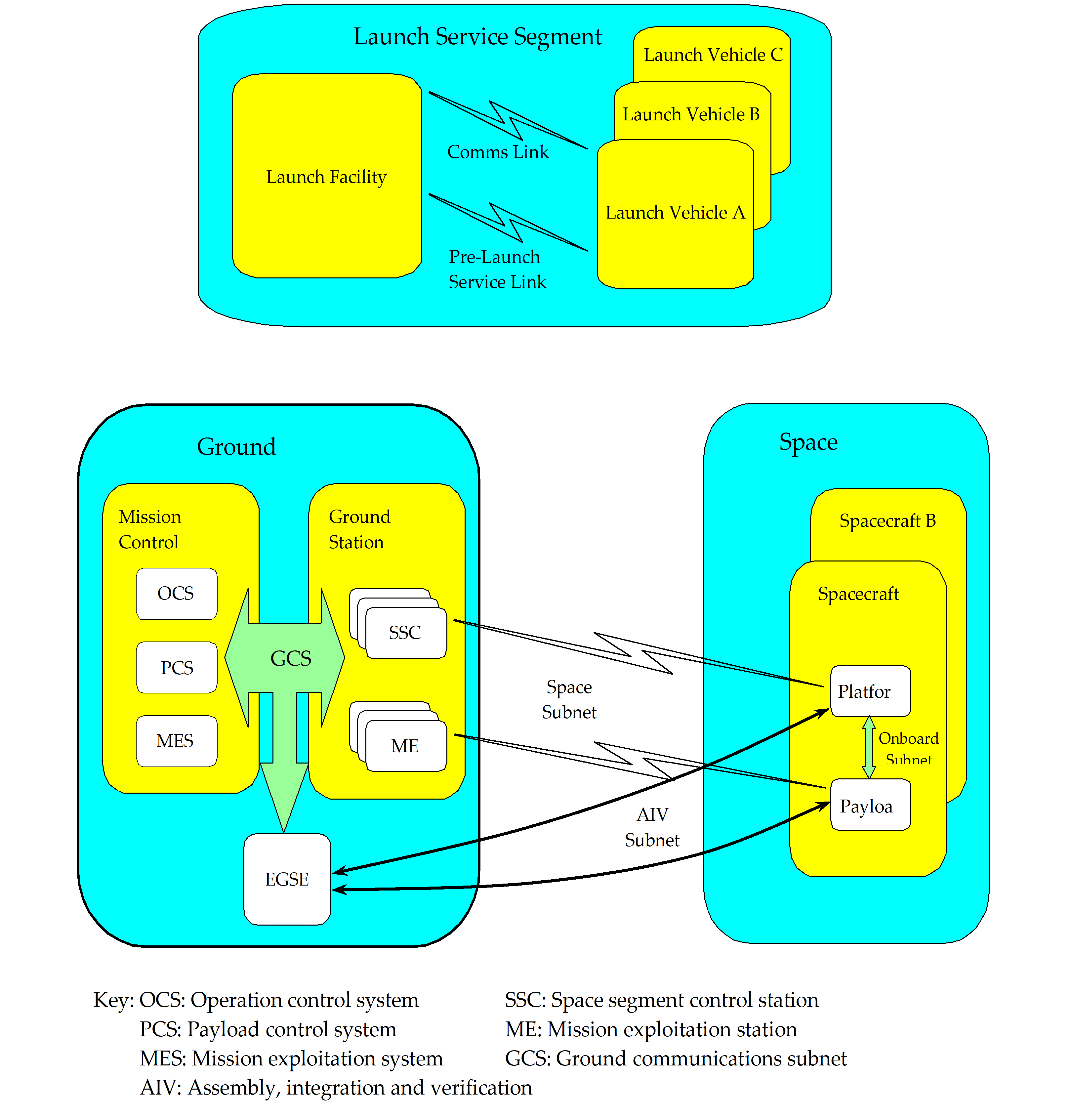 Figure 41: Example of space system elements
Satellite testing
ECSS-E-ST-10, ECSS-E-ST-10-02 and ECSS-E-ST-10-03 define the requirements for space system engineering, verification and testing.
This Standard does not prescribe the levels of integration and test at which procedures are used. This is considered to be a decision taken when the verification approach for a specific mission is defined. However, automated procedures are generally employed from the subsystem level upwards.
The re-use of test procedures at different levels of integration implies standardization of the functionality of the EGSE. Furthermore, the re-use of these procedures in the mission operations domain implies the harmonisation of the requirements for EGSE and mission control systems.
operations
ECSS-E-ST-70 identifies procedures as the primary mechanism for conducting mission operations and defines two types of flight control procedures (FCP):
Nominal procedures
These define the set of in-orbit operations of the space system to be used under nominal conditions. They constitute the building blocks from which the mission timelines and schedules of the flight operations plan (FOP) are constructed.
Contingency procedures
These define the recovery actions used to reconfigure the space system if pre-identified anomalies or failures occur.
Although FCPs have traditionally been executed under manual control, pressure to reduce manpower during routine mission operations implies more automation of routine tasks such as the execution of procedures.
EGSE and mission control system (EMCS)
General
In this Standard, the elements of the ground segment responsible for the monitoring and control of the overall space system, namely the EGSE and the mission control system are referred to jointly as the EMCS.
The procedure language and the procedure development and execution environments are an integral part of any EMCS. As such, they have direct access to other monitoring and control functions implemented within the overall EMCS.
Space system model
ECSS-E-ST-70-31 introduces the concept of a space system model (SSM) as a means for capturing mission knowledge used during AIV and operations. This knowledge is used by the different EMCS applications in order to interact with the space system and to process the dynamic data that is exchanged with it (i.e. space segment telemetry and telecommands, ranging data, ground segment commands and measurements).
The SSM consists of different types of object and the relationships between these objects. The objects of relevance for the procedure language are system elements, reporting data, activities and events.
System elements correspond to:
the elements of the space segment resulting from the functional decomposition defined in ECSS-S-ST-00;
the elements of the ground segment resulting from the functional decomposition defined in ECSS-E-ST-70.
Reporting data and activities are associated with system elements:
Reporting data comprises parameters and compound parameters. A parameter is the lowest level of elementary information that has a meaning for monitoring the space system. A compound parameter is a record comprised of any sequence of parameters, arrays of parameters and sub-records (see also ECSS-E-ST-70-41). For example, a complete telemetry packet, or part thereof, may be represented as a compound parameter. The parameters within a compound parameter are normally interpreted together (e.g. when interpreting the contents of an anomaly report). Reporting data can have different representations depending on its life cycle within the space system (e.g. an on-board measurement has an encoded value in telemetry and a raw or engineering value when presented on a ground segment display).
An activity is a space system monitoring and control function. The term activity is introduced to refer generically to procedures, telecommands (either to the space segment or to the ground segment) and any function provided by the underlying EMCS (e.g. a printer request, sending an e-mail, transferring a file using ftp). A given mission can implement additional mission-specific activity types (e.g. conforming to a non-standard protocol).
Events are associated with system elements, reporting data and activities. An event is an occurrence of a condition or set of conditions that can arise during the course of a test session or a mission phase. It is used to trigger a monitoring and control function implemented within the space system.
An example of a space system model is shown in Figure 41.
 Figure 42: Example of a space system model
During the course of spacecraft testing and mission operations, the space system is configured in different ways, for example:
to test elements of the space segment in a stand-alone manner;
to test the space segment during integration when some elements are missing;
to validate the ground segment with a simulated space segment.
The concepts of system elements, activities, reporting data and events provide a complete definition of the SSM independent of any specific space system configuration. However, for a given space system configuration, only a subset of the overall SSM is used.
In order to understand the scope of the procedure language, it is important to understand what is provided by the SSM. The SSM (as specified in ECSSEST-7031) provides the definition of space system configurations, system elements, activities, reporting data and events.
The procedure language provides the means to:
refer to system elements, activities, reporting data and events but not to define them;
define the procedural script.
For activities, the common set of data definitions in the SSM includes:
name;
description;
type (procedure, telecommand or operating system call);
associated system element;
version number and configuration history;
validation status (i.e. information on the testing status of the activity);
validity period, i.e. the earliest and the latest date on which the activity can be executed;
expected (i.e. mean) duration;
maximum and minimum durations;
list of arguments, including for each argument:
name,
description,
engineering units,
data type, and
default value;
allowed combinations of argument values;
other attributes used for mission planning purposes such as the profile of resources that the activity utilizes (e.g. onboard power and downlink bandwidth).
In addition, the different types of activity have type-specific definitions; for procedures, this includes:
default execution mode (manual or automatic);
activation mode (i.e. whether the procedure is permanently active or is explicitly initiated);
the procedural script.
Requirements to be satisfied by procedures
Procedure structure
The capability shall be provided to construct a high-level, goal-oriented activity (namely a procedure) using elementary activities consisting of telecommands and operating system calls.
A procedure may include calls to execute other procedures.
The capability shall be provided to define self-contained sub-goals for a procedure.
A given sub-goal may be achieved by a single activity call or a sequence of activity calls.
An activity may have associated arguments whose values are passed to the activity at the time of initiation.
Where the achievement of a sub-goal involves complex logic (such as waiting for a period of time, waiting for a condition to become true or conditional branching), a step construct shall be provided to encapsulate the logic.
The capability shall be provided to execute procedure sub-goals in series or in parallel.
Parallel execution is used, for example, when two or more steps can be performed completely independently.
Preconditions may be specified for a procedure.
Preconditions are conditions to be fulfilled before the procedure can start.
Confirmation conditions may be specified for a procedure.
Confirmation conditions are those conditions that determine whether the goal of a procedure is met.
Preconditions and confirmation conditions may also be defined for steps.
In addition to the “nominal flow path” of a procedure (i.e. the flow designed to achieve its primary goal), contingency actions may also be defined.
A procedure contingency action may be executed upon:
- detection of space system anomalies;
- detection of a failure in the execution of the nominal path;
- other specified events or conditions.
In addition to the “nominal flow path” of a step, contingency actions may also be defined.
A step contingency action may be executed upon: - detection of a failure in the execution of the nominal path;
- other specified events or conditions.
A contingency action should be taken at the level at which a failure occurs, i.e. if a failure occurs in the execution of a step, a contingency action should be taken at the level of the step.
A contingency action should rectify the detected anomaly or report it to the user and return control to the nominal flow path of the procedure (or step).
If an anomaly cannot be rectified, one of the following actions shall be performed: - generate an event to flag the problem at a higher level for resolution;
- use other means to achieve the goal of the procedure (or sub-goal of a step) and then terminate the procedure (or step);
- abort the procedure (or step). If a contingency action is invoked, the body of the procedure (or step) shall be suspended until the contingency action is completed.
Language constructs
The capability shall be provided to request the execution of any space system activity.
The capability shall be provided to request the execution of an activity and proceed immediately with the execution of the next statement of the procedure.
The capability shall be provided to request the execution of an activity and wait for the confirmation of execution before continuing.
When a procedure waits for the confirmation of execution of an activity, the result of the execution of the activity shall be tested in order to determine the subsequent course of action.
The capability shall be provided to acquire the following data:
- the execution status or confirmation status of an initiated activity;
- the initiation time, start time, termination time or completion time of the last execution of an activity;
- the value of reporting data;
- the validity status of a parameter;
- the overall monitoring status or detailed monitoring status (limit-check, delta-check, expected status check or status consistency check) of a parameter;
- the sampling time of reporting data;
- the time of the last occurrence of an event. When a given space system function is unavailable (e.g. during an early test phase), the capability shall be provided to replace the missing function. This includes setting:
- the confirmation status of an activity;
- the value of a parameter;
- the validity status of a parameter;
- the overall monitoring status or detailed monitoring status (limit-check, delta-check, expected status check or status consistency check) of a parameter;
- the sampling time of reporting data. To avoid the problem that can arise with asynchronous systems where a new instance of reporting data arrives between two successive procedure statements that use different properties of this object, the capability shall be provided to create a local copy of reporting data.
This ensures that the procedure uses properties of reporting data that have been sampled at the same instant in time.
To ensure that any service provided by the EMCS is accessible within a procedure, the following capabilities shall be provided:
- to request any operation defined for any space system object;
- to acquire the value of any property of any space system object. The capability shall be provided to perform the following execution flow controls within a procedure:
- simple conditional branching (i.e. if … then … else …);
- multiple conditional branching where the path taken is dependent on the value of a specified parameter (or local variable, see j below);
- repeated execution of a statement (or a group of statements) with the possibility of repeating the execution a specified number of times, repeating the execution indefinitely whilst a given condition holds true or repeating the execution until a given condition becomes true;
- wait until a given absolute time;
- wait for a given interval of time to elapse;
- wait until a given condition becomes true;
- wait until a given event occurs.
Local variables used within a procedure shall be declared and their type explicitly stated.
The capability shall be provided to assign a value to a local variable within a procedure.
The capability shall be provided to raise a local event within a procedure (e.g. to trigger a contingency action).
Local events shall be defined as part of the procedure (or step) declarations.
Mathematical, time and string functions as specified in Annex C should be supported.
The capability shall be provided to construct expressions that operate on constants, space system parameters acquired from the EMCS, activity arguments (whose values are supplied at runtime) and local variables.
Engineering units shall be supported.
The capability to assign engineering units to constants shall be supported.
The capability to mix compatible units freely within an expression shall be supported
The automatic conversion between different, but compatible, units shall be supported.
Comments may be included within a procedure.
The capability shall be provided to generate a message for acknowledgement by the user.
The capability shall be provided to generate a message for entry in the procedure execution log.
The capability shall be provided to acquire inputs from the user.
The conditions specified for a procedure (or step) precondition or confirmation may be any combination of the following: - wait until a given absolute time;
- wait for a given interval of time to elapse;
- wait until a given condition becomes true;
- wait until a given event occurs;
- test whether a given condition is true;
- request the user to specify the outcome.
Language specification
Any language that complies with this Standard shall be formally specified using the ISO extended Backus-Naur form (EBNF), in conformance with ISO/IEC 14977.
The PLUTO procedure language, engineering units and functions, as specified in Annex A should be used for the automation of procedures in the development and exploitation phases of space systems.
Use of the PLUTO language ensures conformance with all requirements of this Standard. It also facilitates the transfer of procedure knowledge, acquired in the development phase during functional testing, to the mission operations phase (for a given mission) and encourages the use of a common procedure language across missions.
ANNEX(informative)The PLUTO language
The structure of a procedure
Procedure definition
A procedure comprises the following elements:
An optional declaration body, which declares the local events that can be raised within the procedure.
An optional preconditions body, which ensures that the procedure is only executed if (or when) pre-defined initial conditions are satisfied.
A mandatory main body, which fulfils the goal of the procedure. The main body can be composed of self-contained sub-goals fulfilled by activities or steps.
An optional watchdog body, which manages contingency situations that can arise during the execution of the procedure. The watchdog body is composed of one or more special steps, called watchdog steps, which are all initiated in parallel.
An optional confirmation body, which assesses whether the objectives of the procedure have been achieved or not.
An example of a procedure and its elements is shown in Figure A-1.
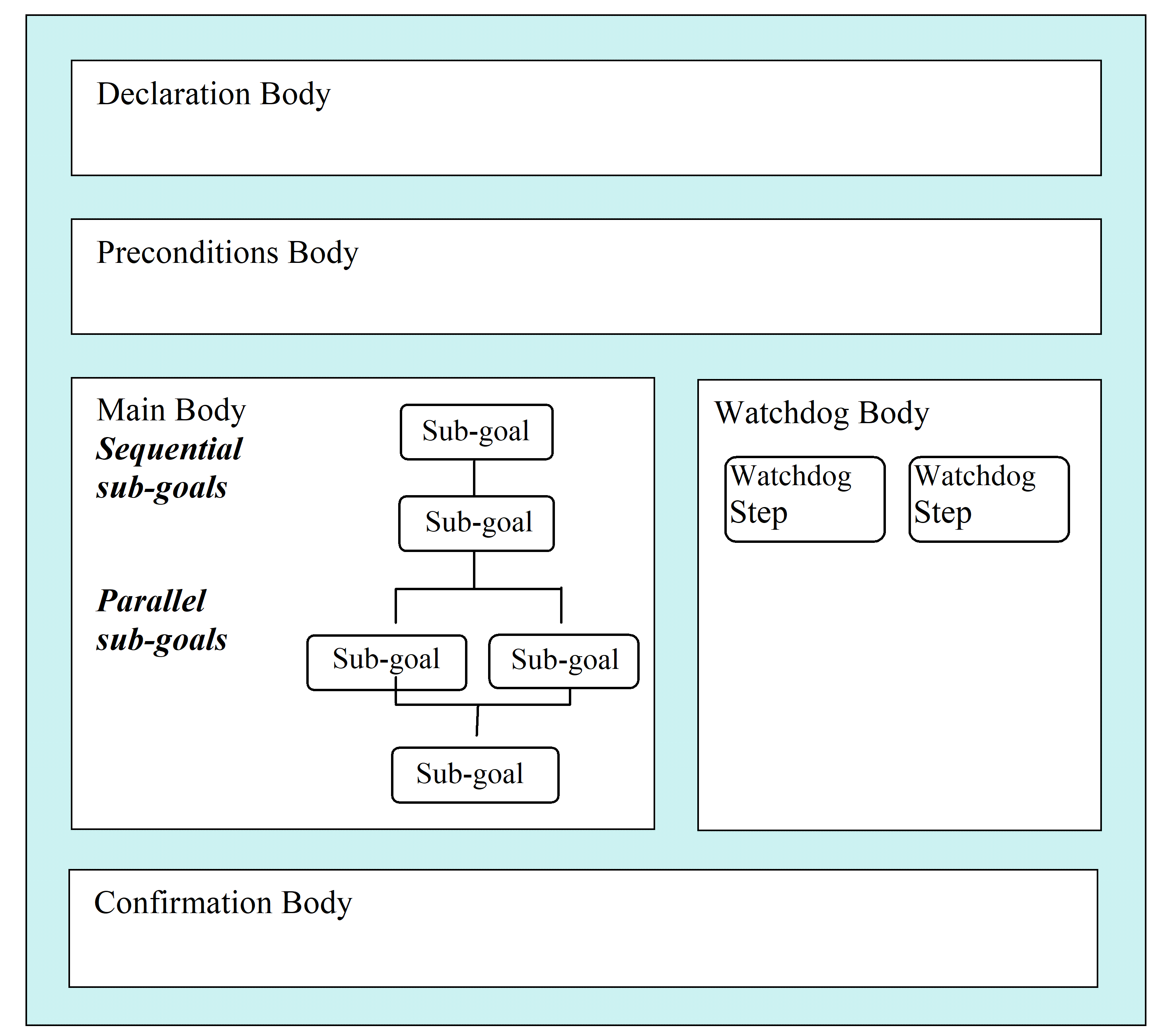 Figure: Example of a procedure and its elements
Procedure declaration body
Local events that can be raised within the procedure, but which are accessible outside of the step in which they are raised (e.g. events that trigger a procedure-level watchdog, see clause A.1.5), are declared at procedure level.
Arguments may be passed to a procedure at initiation time by the entity calling the procedure. These arguments are defined externally (see clause 4.2.2) and not as part of the procedure declarations.
Arguments are similar to parameters in their definition and use.
Argument values cannot be changed within a procedure.
Procedure preconditions body
The preconditions body contains the conditions that define whether a procedure can start. They may be any combination of the following:
wait until a given absolute time;
wait for a given time interval to elapse;
wait until a given condition becomes true;
if the result of a logical expression (Boolean condition) is true;
request a decision from the user.
Procedure main body
The main body of a procedure consists of a sequence of statements of the following type:
set procedure context statement;
initiate in parallel;
initiate and confirm step;
initiate and confirm activity;
initiate activity;
inform user statement;
log statement.
The “initiate in parallel” statement enables a combination of steps and activities to be executed in parallel with the subsequent behaviour being one of the following:
the set of parallel steps or activities ends when any one of the steps or activities has ended;
the set ends when all of the steps or activities have ended.
Procedure watchdog body
The watchdog body is composed of watchdog steps. Each watchdog step monitors for the occurrence of a particular contingency condition and executes corrective actions if the condition occurs.
The purpose of the procedure watchdog body is the following:
Detection of, and reaction to, system-level events, for example space system anomalies. The procedure watchdog body need not rectify all anomalies internally; it can suspend or abort the procedure whilst another procedure handles the anomaly.
Ensuring that procedure-level invariant conditions are sustained for the duration of the procedure.
Management of errors (e.g. failures) in procedure execution that cannot be handled by the watchdog of the relevant procedure main body step (see clause A.1.7.5).
Error handling following execution of a procedure is managed by the calling entity.
Contingency situations monitored for by concurrently active watchdog steps are independent of each other. The reason for this is that when a watchdog step is triggered, it suspends the main body of the corresponding procedure whilst it takes the appropriate recovery action, but any other watchdog steps that are active continue their monitoring. Consequently, if there is any potential interaction between two or more contingency actions, the design of the procedure ensures that they are handled within the same watchdog step.
Procedure confirmation body
Within the confirmation body, a procedure can be confirmed by any combination of the following conditions:
wait until a given absolute time;
wait for a given time interval to elapse;
wait until a given condition becomes true;
if the result of a logical expression (Boolean condition) is true;
request a decision from the user.
Structure of a step
Step definition
The structure of a step is identical to the structure of a procedure: a step is composed of an optional declaration body, a preconditions body (optional for a main body step, mandatory for a watchdog step), a mandatory main body, an optional watchdog body and an optional confirmation body.
The declarations at step-level (see clause A.1.7.2) are different from those at procedure-level and the set of statements that can be used in a step main body (see clause A.1.7.4) is different from that which can be used in a procedure main body.
A step has a name, which is unique within a procedure. This name may be used to refer to the step.
Whilst steps within a procedure main body may have a watchdog body, watchdog steps do not have a watchdog body.
The preconditions body is mandatory for a watchdog step (since the preconditions body defines the contingency condition for which the watchdog step is monitoring).
Step declaration body
The following are declared at step level:
Local variables: the objects defined for internal use within a step.
Local variables are similar to parameters in their definition and use. They have an engineering value and a validity status, which is "invalid" until the variable is first assigned a value.
Local variables can be used by steps contained within a step and also by watchdog steps within the step watchdog body.
Local events: the events that can be raised within the step and which are only accessible from within that step.
Step preconditions body
Within the preconditions body of a main body step, the conditions that define whether a step can start may be any combination of the following:
wait until a given absolute time;
wait for a given time interval to elapse;
wait until a given condition becomes true;
if the result of a logical expression (Boolean condition) is true;
request a decision from the user.
However, the preconditions body of a watchdog step consists of a single “wait” condition.
Step main body
The main body of a step consists of a sequence of statements of the following type:
set step context statement;
assignment statement;
flow control statements:
if statement;
case statement;
loop statements:
while statement;
for statement;
repeat statement;
wait statement;
object operation request statement;
save context statement;
initiate in parallel (steps or activities or both);
initiate and confirm step;
initiate and confirm activity;
initiate activity;
inform user statement;
log statement.
Step watchdog body
A step watchdog body manages the following:
detection of, and reaction to, any failures that occur within the main body of the corresponding step;
ensuring that step-level invariant conditions are sustained for the duration of the step.
Error handling following execution of a step is managed by the calling entity.
Step confirmation body
Within the confirmation body, a step can be confirmed by any combination of the following conditions:
wait until a given absolute time;
wait for a given time interval to elapse;
wait until a given condition becomes true;
if the result of a logical expression (Boolean condition) is true;
request a decision from the user.
The behaviour of a procedure
Procedure execution flow
Procedures can be initiated by different mechanisms within the EMCS, e.g. by a user via an MMI or automatically as a call from another procedure.
During the execution of a procedure, its “execution status” changes to reflect the path that it follows ("preconditions", "executing", "confirmation" or "completed").
On completion, the “confirmation status” of a procedure changes to reflect its success or failure ("confirmed", "not confirmed" or "aborted"). Prior to completion, the confirmation status of the procedure is "not available".
The execution and confirmation statuses can be used by the calling entity to monitor and control the execution of the procedure.
When the procedure is initiated, the procedure preconditions body is executed (execution status: "preconditions", confirmation status: "not available"). The outcome is one of the following:
the preconditions are satisfied, resulting in the initiation of the watchdog body (i.e. the initiation of all watchdog step preconditions bodies) and then the initiation of the main body;
the preconditions are not satisfied, resulting in the aborting of the procedure (execution status: "completed", confirmation status: "aborted").
If the procedure has no user-defined preconditions, the watchdog body and main body are started immediately.
The procedure main body consists of a sequence of statements, which are of the type “initiate” (initiate activity, initiate and confirm step, initiate and confirm activity or initiate steps or activities in parallel), or are informative in nature (inform user or log), or define the context in which statements are executed.
When the main body is started, the first statement in the sequence is executed. Subsequent statements are executed according to the sequence logic (execution status: "executing", confirmation status: "not available").
The initiate and confirm statements (step or activity) include a continuation test, which determines how the main body continues based on the final value of the confirmation status. The outcome is one of the following:
continue the execution of the main body;
restart the current step or activity, i.e. restart from the preconditions body (if defined);
raise a local event that is caught by a watchdog step;
abort the procedure (execution status: "completed", confirmation status: "aborted").
The watchdog body comprises a number of (watchdog) initiate and confirm step statements. When the watchdog body is started, all of its step statements are initiated in parallel. Each watchdog step is designed to detect a particular contingency situation.
If none of these contingency situations arises during the procedure execution, the watchdog body is automatically terminated when the procedure main body ends execution;
If a contingency arises, the main body of the procedure is suspended whilst the contingency is handled by the relevant watchdog step (execution status: "executing", confirmation status: "not available").
Suspension of the main body means that the currently executing atomic statement is completed, but the subsequent action (if any) indicated as a result of that statement is not taken.
- 1 An atomic statement is the lowest level of statement within the procedure language. All statements except “initiate and confirm step”, “initiate activity”, “initiate and confirm activity” and “initiate in parallel” are atomic in nature.
- 2 In the case that the main body is executing an “initiate in parallel” statement, all executing statements are suspended when all currently executing atomic statements are completed.
The subsequent flow depends on the success or otherwise of the recovery and the “continuation action” arising within the watchdog step. The following cases can arise:
The contingency is rectified and control is returned to the procedure main body (continuation action: "resume", execution status: "executing", confirmation status: "not available"). The execution of the main body is resumed at the end of the previously executing atomic statement. The watchdog step that handled the contingency is re-started.
The contingency is handled by the watchdog by achieving the procedure goal through an alternative path. The procedure main body and the procedure watchdog body are then terminated and the procedure confirmation body is started (continuation action: "terminate", execution status: "confirmation", confirmation status: "not available").
The contingency cannot be handled by this watchdog step, in which case either a local event is raised, which triggers another watchdog step (continuation action: "raise event"), or the procedure is aborted (continuation action: "abort", execution status: "completed", confirmation status: "aborted").
If a second watchdog step is triggered whilst the first is still executing, the two watchdog steps are executed in parallel. Control is only returned to the procedure main body when both watchdog steps have completed execution. The watchdog steps are restarted as soon as they complete execution. If either watchdog step yields an "abort" continuation action, the procedure is aborted immediately.
When the main body has completed execution (i.e. when all initiated steps and activities have completed execution), the watchdog body is terminated and the confirmation body is executed (execution status: "confirmation", confirmation status: "not available").
This execution includes any parallel steps and activities that were initiated as part of an “initiate in parallel” statement with an "until one completes" termination condition.
When the confirmation body has completed execution, the procedure execution is completed. The outcome is one of the following:
the confirmation conditions are fulfilled (execution status: "completed", confirmation status: "confirmed");
the confirmation conditions are not fulfilled (execution status: "completed", confirmation status: "not confirmed").
If the procedure has no user-defined confirmation conditions, an implicit condition is used instead that depends on whether or not the confirmation body has been initiated by a watchdog step terminate action:
If the confirmation body has been initiated by a “terminate” action of a watchdog step, the procedure confirmation status is set to the confirmation status of the watchdog step.
Otherwise, the confirmation status is set to:
"confirmed" if all the activities and steps that have been initiated in the main body have been confirmed.
"not confirmed" in all other cases.
Figure A-2 shows the different execution states through which a procedure can pass when it is executed and the allowed transitions between these states.
Figure: Execution states and transitions for a procedure
Step execution flow
Steps are initiated by the execution of one of the following statements:
within a procedure (or step) main body: “initiate and confirm step” or “initiate in parallel”;
within a procedure (or step) watchdog body: “initiate and confirm step”.
The initiate statement implies both the execution of the step bodies and the “continuation action” derived from the execution result which determines the subsequent course of action.
The execution of the step preconditions body and main body proceeds in the same manner as described in clause A.2.1 for the procedure preconditions and main bodies.
The step watchdog body comprises a number of watchdog steps, each designed to detect a particular contingency:
If none of these contingency situations arises during the step execution, the step watchdog body is automatically terminated when the step main body ends execution.
If a contingency arises, the main body of the step is suspended whilst the contingency is handled by the relevant watchdog step (execution status: "executing", confirmation status: "not available").
The subsequent flow depends on the success or otherwise of the recovery and the continuation action arising within the watchdog step. The following cases can arise:
The contingency is rectified and control is returned to the step main body (continuation action: "resume", execution status: "executing", confirmation status: "not available"). The watchdog step that handled the contingency is re-started.
The contingency is handled by the watchdog by achieving the step goal through an alternative path. The step main body and the step watchdog body are then terminated and the step confirmation body is started (continuation action: "terminate", execution status: "confirmation", confirmation status: "not available").
The contingency cannot be handled by this watchdog step, in which case either a local event is raised, which triggers another watchdog step (continuation action: "raise event") or the step is aborted (continuation action: "abort", execution status: "completed", confirmation status: "aborted").
If two watchdog steps are triggered at the same time, their subsequent behaviour is the same as described for a procedure.
When the step main body has completed execution, the step watchdog body is terminated and the execution of the step confirmation body is initiated (execution status: "confirmation", confirmation status: "not available").
When the confirmation body has completed execution, the step execution is completed (confirmation status: "confirmed" or "not confirmed").
For a step, the decision on how to proceed following execution is defined within the continuation test, depending on the value of the step confirmation status ("confirmed", "not confirmed" or "aborted"). A continuation action is defined for each confirmation status, either explicitly within the initiate step statement, or by default. This is unlike for a procedure, where the decision on how to proceed following execution remains with the calling entity.
If the outcome of the continuation test is "restart", the step restarts (execution status: "preconditions"). Otherwise, the step completes execution (execution status: "completed").
If there are no user-defined preconditions or confirmation conditions for a given step, default conditions are used. These default conditions are the same as defined in clause A.2.1 for a procedure.
Figure A-3 shows the different execution states through which a step can pass when it is executed and the allowed transitions between these states.
Figure: Execution states and transitions for a step
Activity execution flow
Activities are initiated directly within a procedure or within a step by the execution of either an “initiate activity” or an “initiate and confirm activity” statement. The control of the execution of an activity is managed by the EMCS.
Figure A-4 shows the different executions states through which an activity can pass when it is executed and the allowed transitions between these states. Depending on how the activity is implemented, e.g. as a telecommand or a procedure, different notifications are reported by the EMCS for the monitoring of the progress of execution by the initiating entity. These notifications correspond to the state transitions, but also to sub-state transitions which are specific to different activity types (e.g. for telecommand, routing stages such as “released from EMCS”, “reception by ground station” and “reception on-board”).
In the case of an “initiate activity” statement, the calling entity (procedure or step) proceeds with the execution of the next statement without waiting for notification of completion of the activity.
In the case of an “initiate and confirm activity”, the decision on how to proceed following execution is defined within the continuation test, depending on the value of the confirmation status ("confirmed", "not confirmed" or "aborted"). As for a step, the continuation action is defined for each confirmation status, either explicitly within the initiate statement, or by default.
If the outcome of the continuation test is "restart", the activity restarts (execution status: "preconditions"). Otherwise, the activity completes execution (execution status: "completed").
Figure: Execution states and transitions for an activity
Execution in parallel
When an “initiate in parallel” statement is executed, all constituent steps and activities are initiated in parallel.
Where the termination condition of the “initiate in parallel” statement is defined as "until one completes", the first step or activity to complete initiates the execution of the next statement in the main body of the calling entity (procedure or step). All other parallel steps and activities continue to execute after the first one has completed. When these other parallel steps and activities complete, the continuation actions indicated in their respective continuation tests are taken, except if the specified action is "continue" when no further action is taken.
Where the termination condition of the “initiate in parallel” statement is defined as "until all complete", the continuation actions evaluated within the individual steps and activities (or input by the user, if "ask user" is the continuation action) can be different.
When the action returned by a given step or activity is "abort", the procedure (or step) is immediately aborted (including aborting any other parallel steps and activities that are still executing).
When the action returned by a given step or activity is "restart", the action is taken immediately and the initiated step or activity is restarted. Its execution status is reset to "preconditions" and its confirmation status is reset to "not available". The “initiate in parallel” statement cannot complete until the restarted step or activity has completed.
When the action returned by a given step or activity is "raise event", the event is raised immediately, the event is then caught by a watchdog step which suspends its corresponding main body.
Continuation following an “initiate and confirm” statement
An “initiate and confirm” statement can have an explicit “continuation test” as part of its definition. This continuation test consists of up to three couplets of confirmation status and corresponding continuation action (one couplet for each confirmation status). In the event that no continuation test is specified (or less than three couplets are specified), default continuation actions are defined.
Figure A-5 presents the default, allowed and forbidden combinations of confirmation status and continuation action for “initiate and confirm” statements that are part of a main body.
The allowed combinations of confirmation status and continuation action can be extended for special testing scenarios. For example, a test can be designed to validate the rejection of a critical command, such as “deploy solar array”, where the successful outcome of the test is that the corresponding activity is "aborted". In this case, the continuation action "continue" can be defined for the confirmation status "aborted".
Figure A-6 presents the default, allowed and forbidden combinations of confirmation status and continuation action for “initiate and confirm” statements that are part of a watchdog.
|
Confirmation status |
Continuation action |
|||||||
|
|
"resume"
|
"abort"
|
"restart"
|
"ask user"
|
"raise event"
|
"continue"
|
"terminate"
| |
|
|
"confirmed"
|
|
|
|
|
|
|
|
|
"not confirmed"
|
|
|
|
|
|
|
|
|
|
"aborted"
|
|
|
|
|
|
|
|
|
|
Key:
|
|
Default
|
|
Allowed
|
|
Forbidden
|
Figure: Confirmation status and continuation action combinations for main body “initiate and confirm” statements
|
Confirmation status |
Continuation action |
|||||||
|
|
"resume"
|
"abort"
|
"restart"
|
"ask user"
|
"raise event"
|
"continue"
|
"terminate"
| |
|
|
"confirmed"
|
|
|
|
|
|
|
|
|
"not confirmed"
|
|
|
|
|
|
|
|
|
|
"aborted"
|
|
|
|
|
|
|
|
|
|
Key:
|
|
Default
|
|
Allowed
|
|
Forbidden
|
Figure: Confirmation status and continuation action combinations for watchdog “initiate and confirm” statements
The meaning of the different continuation actions is as follows:
"resume"
Only used within the continuation test of a watchdog “initiate and confirm” statement. It resumes the execution of the main body of the procedure (or step) at the place at which it was suspended when the contingency was detected.
"abort"
Aborts the procedure (or step).
"restart"
Only used within the continuation test of a main body “initiate and confirm” statement and it restarts the corresponding “initiate and confirm” statement. To avoid a potentially indefinite loop, a timeout or a maximum number of iterations can be specified. The timeout is expressed as a relative time from the start of execution time of the statement. If the timeout or the maximum number of iterations is exceeded then either:
an event is raised which terminates the statement and is then handled by a corresponding watchdog step, or
the parent procedure (or step) is aborted.
"ask user"
Asks the user to specify how to proceed.For a main body “initiate and confirm” statement, the user may select any continuation action except "resume", "ask user" and "terminate". For a watchdog “initiate and confirm” statement, the user may select any continuation action except "continue" and "ask user".
"raise event"
Raises a local event, which is caught by a watchdog step of the procedure (or step). When the watchdog step has performed its function, the execution of the main body of the procedure (or step) resumes at the place at which it was suspended when the watchdog was triggered.
"continue"
Only used within a continuation test of a main body “initiate and confirm” statement. It implies that the procedure (or step) continues to be executed according to the content of the main body.
"terminate"
Only used within the continuation test of a watchdog “initiate and confirm” statement. It prematurely ends the execution of the procedure (or step) main body and starts the execution of the confirmation body.
In the case of a watchdog “initiate and confirm step” statement, the step itself is re-initiated unless the continuation action is "abort".
PLUTO language definition
Conventions
The terminology used in defining the syntax of the procedure language is compatible with ISO/IEC 14977.
The syntax of the procedure language is a set of rules, collectively known as a grammar.
Each rule defines a construct of the language, known as a “non-terminal symbol”. A non-terminal symbol is a combination of zero or more non-terminal symbols and “terminal symbols”. A terminal symbol is a sequence of one or more characters forming an irreducible element of the language.
A terminal symbol may consist of one or more words separated by one or more separators. The space, tab and end-of-line characters are separators.
The definition of the language constructs uses a graphical convention known as a “railroad” diagram, an example of which is shown in Figure A-7. The elements of this graphical convention are listed below:
the name at the top of the diagram is that of the non-terminal symbol being defined;
the main line corresponds to mandatory elements of the construct;
branch lines correspond to optional elements;
“return” lines correspond to optional repetitions of one or more elements;
non-terminal symbols are enclosed in rectangles;
terminal symbols are enclosed in round-cornered boxes (in the limit, a circle).
 Figure: Example railroad diagram
Figure A-7 defines that a repeat statement starts with the keyword “repeat” followed by one or more step statements, each separated by a “;”, followed by the keyword “until” and an expression (whose result, when true, terminates the repeat loop), followed by an optional timeout.
Language case sensitivity
Only engineering units (as defined in Annex B) are case sensitive. All other words used in the language are not case-sensitive.
Comments
Comments may be inserted within a procedure. Comments have no effect on the execution of a procedure.
Comments begin and end with the character pair symbols "/" and "/" respectively.
Keywords
A number of words have a special meaning in the procedure language. If any of these words are used in the naming of space system objects (e.g. in the name of a parameter), it is important to ensure that there is no potential ambiguity for end-users when interpreting a procedure. For the system implementing the procedure language, the ambiguity is resolved by the application of precedence rules that are either specified implicitly by the grammar or defined explicitly in this Standard.
These words are called “keywords” and are shown in bold face and between straight quotes.
"procedure", "not confirmed", ">=", "XOR", "execution status", "acos", "is contained in"* 1 Spaces (such as white space, tab and carriage return) within keywords are treated as single blanks.
- 2 Keywords are not case-sensitive.
Identifiers
An identifier denotes a name and consists of one or more words separated by spaces, where each word is a sequence of letters and digits.
An identifier is unique within its own context. For example, step identifiers are unique within a procedure, but the same step identifier may be used in several procedures.
Reference to an object outside its context is achieved by use of an “object reference path” (see clause A.3.9.8 for the “Object Reference” language construct).
An identifier has the general form:


 where:
Letter is an upper-case or lower-case letter of the alphabet;
Digit is one of the decimal characters from 0 to 9.
Constants
A constant can be one of the following:
 A Boolean constant is represented as:
 An enumerated constant is represented by:
 where Characters is any sequence of letters or digits or one of the following characters:
space ! " # $ % & ' ( ) * + , - . / : ; < = > ? @ [ \ ] ^ _ ` { | } ~
To enter a double quote, it is preceded by a reverse solidus character (i.e. "</b>").
To enter a reverse solidus character, it is preceded by a reverse solidus character.
"red", "yellow", "green", "not confirmed"An integer constant is represented as:
 where Sign is as follows:
 Digit is one of the decimal characters from 0 to 9.
?Engineering Units? is one of the engineering units defined in Annex B.
The “?” is a special-sequence-symbol which indicates the start and end of a special sequence (see ISO/IEC 14977); in this case a standalone syntax for Engineering Units.
Hexadecimal Constant is defined as follows:
 The Hexadecimal Symbol is the character pair symbol "0x".
The Hexadecimal Digit is a decimal character from 0 to 9 or a letter from A to F;
23 A, 2056, 0x2056, 0xFFFFA real constant is represented as:
 123.56e12, 0.1, 23E6, 5.3 [kg/m^3]A string constant is represented as:
 "The double-quote character is : ". "An absolute time constant is represented as:
 Month/day of month calendar variation
Year-Month-Day Of MonthTHour:Minute:Second.Fraction Of Second(Z)
where:
Year = four digits with a value in the range 0001-9999;
Month = two digits with a value in the range 01-12;
Day Of Month = two digits with a value in the range 01-28, 01-29, 01-30, or 01-31;
"T" = calendar-time separator;
Hour = two digits with a value in the range 00-23;
Minute = two digits with a value in the range 00-59;
Second = two digits with a value in the range 00-59 (00-58 or 00-60 during leap seconds);
Fraction Of Second = one to n digits. To obtain a given precision, the appropriate number of digits to the right of the period is used;
"Z" = optional terminator.
2001-08-18T21:07:43.137468ZYear/day of year calendar variation
Year-DayTHour:Minute:Second.Fraction Of Second(Z)
where:
Year, "T", Hour, Minute, Second, Fraction Of Second, "Z": are as defined in 1. above;
Day = three digits with a value in the range 001-365 or 001366.
2001-033T13:21:32.226 * Leading zeros are included to make up the specified number of digits.
* Elements shown in brackets are optional.
A relative time (duration) constant is represented as:
 where:
Days, Hours, Minutes and Seconds are unsigned integers;
Hour, Minute, Second and Fraction Of Second are as defined in f. above.
30 h 10 min, 200 s, - 0:00:10:00#### Types
A type defines the set of values that variables and expressions possessing that type may assume.
The type of a variable determines its use in various contexts. For example, in an assignment, it is mandatory that the left and right-hand sides of the assignment are type-compatible.
The procedure language supports the predefined types shown in Table A-1.
Table: Predefined types
|
Data type
|
Definition
|
|
Boolean
|
Defines the set of truth values denoted by the predefined constants true and false
|
|
Enumerated set reference
|
Defines a reference to a set of enumerated valuesa
|
|
Signed integer
|
Defines an implementation subset of signed integer values
|
|
Unsigned integer
|
Defines an implementation subset of unsigned integer values
|
|
Real
|
Defines an implementation subset of real values
|
|
String
|
Defines a set of values that are character strings
|
|
Absolute time
|
Defines a set of values that represent an absolute date such as 2003-02-15
|
|
Relative time
|
Defines a set of values that represent an interval of time such as 2 s
|
|
Property value set
|
Defines an enumerated set comprising all values of a property of a system element, reporting data, activity or event
|
|
Property data type
|
Defines a data type inherited from a property of a given system element, reporting data, activity or event
|
|
a Enumerated sets can be defined on a system-wide basis or locally within a procedure and are referenced by name, e.g. the enumerated set named Event Type comprises the set of values {"", "Low Severity", "Medium Severity", "High Severity"}.
| |
System interfaces
The SSM objects relevant to the procedure language are introduced in clause 4.2.2. Each type and subtype of SSM object has a number of properties and operations that are accessible using services provided by the EMCS.
“Initiate” and “Initiate and Confirm” are two important EMCS services for activities which can be invoked using dedicated statements of the procedure language. In addition, the language provides two generic mechanisms to invoke other services of the EMCS:
The Object Property Request which is used to return a property of an object (e.g. get the initiation time of an activity, get the status of a printer). The minimum sets of “standard” property requests for activities, reporting data and events are specified in clause A.3.9.36.
The Object Operation Request Statement which is used to perform an operation on an object (e.g. clear printer queue, open/close operating system file). The minimum sets of “standard” operation requests for activities and reporting data are specified in clause A.3.9.24.
“Standard” means that these services are supported by all EMCS implementations. A given implementation of the procedure language may also support non-standard services.
Language constructs
Procedure Definition
|
Meaning |
Defines the elements of a procedure.
|
|
Syntax |
|

|
Definition |
Procedure Declaration Body
|
Procedure Declaration Body
|
Meaning |
Declares the local events that can be raised within a procedure.
|
|
Syntax |
|


|
Definition |
Event Declaration
|
|
Example |
|
|
Procedure Name
|
Slew Manoeuvre
|
|
PLUTO script
|
procedure declare event Manoeuvre Damping Failed described by "Cross-track error not reducing to less than 5 arcmin within 100 s of manoeuvre completion" end declare <……> end procedure |
Preconditions Body
|
Meaning |
Defines the conditions under which the execution of a procedure (or step) can proceed once it is initiated.
|
|
Syntax |
|

|
Definition |
Expression
|
|
The "then" loop is used to specify a combination of different conditions.
| |
|
Example |
|
|
Procedure Name
|
Switch on Gyro5 in Fine Mode |
|
PLUTO script
|
procedure preconditions wait until Gyro Temperature > 60 degC end preconditions main initiate and confirm Switch on Gyro Converter; initiate and confirm Switch on Gyro5; initiate and confirm Gyro5 Fine Mode; end main end procedure |
Wait Statement
|
Meaning |
Defines a delay.
|
|
Syntax |
|


|
Definition |
Expression
|
|
|
When the wait statement appears in a preconditions body, the raise event option (following a timeout) is not available, since the corresponding watchdog body has not yet been started. Therefore, the procedure (or step) is aborted if the specified timeout interval is exceeded.
|
Save Context
|
Meaning |
Creates a copy of reporting data for local use.
|
|
Syntax |
|


|
Definition |
Reporting Data Reference
|
|
|
Reporting data has a life cycle that is independent of the procedure execution environment. Reporting data can therefore be updated during the execution of a set of procedure statements.
|
|
Example |
|
|
Procedure Name
|
Eclipse Operations
|
|
PLUTO script
|
procedure main <……> wait for event Eclipse Entry
|
Timeout
|
Meaning |
Defines a timeout interval for the current statement.
|
|
Syntax |
|

|
Definition |
Expression
|
Raise Event
|
Meaning |
Raises a local event.
|
|
Syntax |
|

|
Definition |
Event Name
|
|
Example |
|
|
Procedure Name
|
Slew Manoeuvre
|
|
PLUTO script
|
procedure declare event Manoeuvre Damping Failed, <……>
|
Object Reference
|
Meaning |
Refers to an object by means of a reference path.
|
|
Syntax |
|


|
Definition |
Object Reference
|
|
|
Where the object type is not given explicitly and the result of the object reference is not unique within the overall SSM, the reference is resolved according to the following precedence rules (1 = highest precedence, 14 = lowest precedence):
|
|
Example |
|
|
PLUTO script
|
Temperature of Catalyst Bed of Thruster X of Thruster Main Branch
|
Procedure Main Body
|
Meaning |
Contains the statements that achieve the goal of the procedure.
|
|
Syntax |
|


|
Definition |
Procedure Statement
|
|
Example |
|
|
Procedure Name
|
Switch on Gyro5 in Fine Mode |
|
PLUTO script
|
procedure initiate and confirm step Switch on Gyro5 Converter main initiate and confirm Switch on Gyro Converter; end main end step; initiate and confirm step Power on Gyro5 main initiate and confirm Switch on Gyro5; initiate and confirm Gyro5 Fine Mode; end main end step; end procedure |
Set Procedure Context Statement
|
Meaning |
Defines the context in which a set of procedure statements executes.
|
|
Syntax |
|

|
Definition |
This statement explicitly defines the context in which a set of procedure statements executes. This overrides the current default context which is the one in which the procedure is currently executing.
|
|
Example |
|
|
Procedure Name
|
Test telescopes |
|
PLUTO script
|
procedure <……> in the context of Telescope1 do initiate and confirm Power on; initiate and confirm Take image; initiate and confirm Process and display image; initiate and confirm Power off; end context; in the context of Telescope2 do initiate and confirm Power on; initiate and confirm Take image; initiate and confirm Process and display image; initiate and confirm Power off; end context; <……> end procedure |
Initiate In Parallel Statement
|
Meaning |
Defines a set of steps or activities (or both) that are executed in parallel.
|
|
Syntax |
|

|
Definition |
Initiate And Confirm Step Statement
|
|
|
When the parallel statement is executed, each of its constituent steps or activities is initiated in parallel. The termination of the execution depends on the selected termination condition, as defined below:
|
|
|
If neither of these conditions is explicitly specified, the default behaviour is "until all complete".
|
|
Example |
|
|
Procedure Name
|
Switch on Gyro3 and Gyro5 in Fine Mode |
|
PLUTO script
|
procedure preconditions wait until Gyro3 and Gyro5 Converter = "ON" end preconditions main in parallel until all complete initiate and confirm step Switch on Gyro3 in Fine Mode preconditions wait until Temperature of Gyro3 > 60 degC end preconditions main initiate and confirm Switch on Gyro3; initiate and confirm Gyro3 Fine Mode; end main end step; initiate and confirm step Switch on Gyro5 in Fine Mode preconditions wait until Temperature of Gyro5 > 60 degC end preconditions main initiate and confirm Switch on Gyro5; initiate and confirm Gyro5 Fine Mode; end main end step; end parallel; end main end procedure |
Initiate And Confirm Step Statement
|
Meaning |
Initiates a designated step and waits for confirmation of its execution.
|
|
Syntax |
|


|
Definition |
Step Name
|
|
|
The initiated step finishes completely before the initiating procedure (or step) may proceed.
|
Step Definition
|
Meaning |
Defines the elements of a step.
|
|
Syntax |
|

|
Definition |
Step Declaration Body
|
Step Declaration Body
|
Meaning |
Declares the local variables used by a step and the local events that can be raised within it.
|
|
Syntax |
|


|
Definition |
Enumerated Set Declaration
|
Step Main Body
|
Meaning |
Contains the statements that achieve the sub-goal of the step.
|
|
Syntax |
|


|
Definition |
Step Statement
|
Set Step Context Statement
|
Meaning |
Defines the context in which a set of step statements executes.
|
|
Syntax |
|

|
Definition |
This statement explicitly defines the context in which a set of step statements executes. This overrides the current default context which is the one in which the step is currently executing.
|
|
Example |
|
|
Procedure Name
|
Payload switch on |
|
PLUTO script
|
procedure <……> initiate and confirm step Switch on Telescopes in the context of Telescope1 do initiate and confirm Power on;
|
Assignment Statement
|
Meaning |
Assigns a value to a local variable.
|
|
Syntax |
|


|
Definition |
Variable Reference
|
|
Example |
|
|
PLUTO script
|
Voltage := Value of T001 * 10
|
Flow Control Statement
|
Meaning |
Conditionally or iteratively executes a set of statements.
|
|
Syntax |
|

|
Definition |
If Statement
|
If Statement
|
Meaning |
Executes one statement (or set of statements) or another depending on the result of a logical condition.
|
|
Syntax |
|

|
Definition |
Expression
|
|
Example |
|
|
Procedure Name
|
Slew Manoeuvre
|
|
PLUTO script
|
procedure <……> if Target Offset < 0.05 deg then
|
Case Statement
|
Meaning |
Multiple conditional branching depending on the value of an expression.
|
|
Syntax |
|


|
Definition |
Expression
|
|
|
The case statement works in the following way:
|
|
Example |
|
|
PLUTO script
|
in case Temperature of Biolab Experiment
|
Repeat Statement
|
Meaning |
Conditional iteration of a statement (or set of statements) with control at the end, optionally terminated by a timeout.
|
|
Syntax |
|
|
Definition |
Step Statement
|
|
|
The repeat statement differs from the while statement in that the condition is evaluated after each execution of the statement (or set of statements).
|
While Statement
|
Meaning |
Conditional iteration of a statement (or set of statements) with control at the beginning, optionally terminated by a timeout.
|
|
Syntax |
|

|
Definition |
Expression
|
|
|
The while statement differs from the repeat statement in that the condition is evaluated before each execution of the statement (or set of statements). As a result, the statement (or set of statements) may never be executed at all.
|
For Statement
|
Meaning |
Iterates the execution of a statement (or set of statements) a fixed number of times.
|
|
Syntax |
|

|
Definition |
Variable Reference
|
|
|
The value of the counter may be referred to within the list of statements, but not changed. As a result, the counter is not used as the left-hand side of an assignment statement.
|
|
Example |
|
|
Procedure name
|
Enable Payload Thermal Control Lines |
|
Arguments
|
Number of Heater Lines: unsigned integer |
|
PLUTO script
|
procedure preconditions wait until All Payloads = "OFF" end preconditions main initiate and confirm step Enabling declare unsigned integer Counter end declare main for Counter := 1 to Number of Heater Lines do initiate and confirm Enable Thermal Control Line with Line Number := Counter end with; end for end main end step; end main end procedure |
Object Operation Request Statement
|
Meaning |
Invokes an operation of an object.
|
|
Syntax |
|


|
Definition |
Object Operation
|
|
|
The standard operations that can be requested for an activity or step are listed in Table A-2 and for reporting data, variable or procedure argument in Table A-3 (there are no standard operations for an event).
|
Table: Activity and step operation requests
|
Operation request
|
Meaning
|
Argument
|
Result
|
|
"set confirmation status"
|
Sets the confirmation status of the activity or step
|
"not available"or "confirmed"or "not confirmed"or "aborted"
|
None
|
Table: Reporting data, variable and argument operation requests
|
Operation request
|
Meaning
|
Argument
|
Result
|
|
"set validity status"
|
Sets the validity status of a parameter, a variable or a procedure argument
|
"not available"or "valid"or "invalid"
|
None
|
|
"set value"
|
Sets the engineering value of a parameter, a variable or a procedure argument
|
any pre-defined type
|
None
|
|
"set monitoring status"
|
Sets the overall monitoring status of a parameter
|
"not available" or "nominal"or "failed"
|
None
|
|
"set status consistency check status"
|
Sets the status consistency check status of a parameter
|
"not available" or "nominal"or "failed"
|
None
|
|
"set limit check status"
|
Sets the limit check status of a parameter
|
"not available" or "danger high"or "warning high"or "within limits"or "warning low"or "danger low"
|
None
|
|
"set delta check status"
|
Sets the delta check status of a parameter
|
"not available" or "nominal"or "failed"
|
None
|
|
"set expected check status"
|
Sets the expected state check status of a parameter
|
"not available" or "nominal"or "failed"
|
None
|
|
NOTE The procedure language includes operations to set the value, or another property, of reporting data, variables and procedure arguments. These operations are normally performed by other functions of the space system (e.g. the spacecraft, the EMCS health monitoring function) and can only be invoked by the procedure language in configurations where these functions are not present.
| |||
|
Example |
|
|
PLUTO script
|
set value of T002 with 1.0 end with;
|
Save Context Statement
|
Meaning |
Creates a copy of one or more reporting data for local use.
|
|
Syntax |
|

|
Definition |
Save Context
|
Initiate And Confirm Activity Statement
|
Meaning |
Initiates a designated activity and waits for confirmation of completion.
|
|
Syntax |
|


|
Definition |
Activity Call
|
|
|
The initiated activity finishes completely before the initiating entity (procedure or step) proceeds.
|
Initiate Activity Statement
|
Meaning |
Asynchronously initiates a designated activity.
|
|
Syntax |
|

|
Definition |
Activity Call
|
|
|
The initiated activity proceeds in parallel with the initiating entity.
|
Activity Call
|
Meaning |
Calls an activity.
|
|
Syntax |
|


|
Definition |
Activity Reference
|
|
Examples |
Typical examples of the use of the different types of simple argument for activities of type telecommand are:
|
|
PLUTO script
|
initiate Insert into Schedule with array
|
Inform User Statement
|
Meaning |
Outputs a message for acknowledgement by the user.
|
|
Syntax |
|

|
Definition |
Expression
|
Log Statement
|
Meaning |
Outputs a message to the procedure execution log.
|
|
Syntax |
|

|
Definition |
Expression
|
Watchdog Body
|
Meaning |
Handles contingency situations defined for a procedure (or step).
|
|
Syntax |
|

|
Definition |
Initiate And Confirm Step Statement
|
|
|
When more than one watchdog step is triggered, the following rules apply:
|
|
Example |
|
|
Procedure name
|
Data Bus Reconfiguration |
|
PLUTO script
|
procedure main initiate and confirm step Enter Ground Intervention Mode initiate and confirm Activate GIM; end step; initiate and confirm step Reconfigure Data Bus preconditions wait until AOCS Mode = "GIM" end preconditions initiate and confirm Switch Bus From B To A; initiate and confirm Activate Bus Acquisition; end step; initiate and confirm step Exit Ground Intervention Mode initiate and confirm Deactivate GIM; end step; end main watchdog initiate and confirm step Check Depointing preconditions wait until Pitch > 10 deg OR Roll > 10 deg OR Yaw > 10 deg end preconditions initiate and confirm Activate Bus Acquisition; initiate and confirm Exit Ground Intervention Mode; initiate and confirm Activate Coarse Mode; end step; end watchdog end procedure |
Confirmation Body
|
Meaning |
Defines the conditions under which a procedure (or step) is confirmed.
|
|
Syntax |
|

|
Definition |
"if" Expression
|
|
|
The "then" loop is used to specify a combination of different conditions.
|
|
Example |
|
|
Procedure name
|
Switch on Gyro5 |
|
PLUTO script
|
procedure <……> confirmation wait until Output of Gyro5 < 0.2 deg/h end confirmation end procedure |
Continuation Test
|
Meaning |
Defines how to proceed after the associated “initiate and confirm” statement is executed.
|
|
Syntax |
|


|
Definition |
The continuation test comprises a set of couplets of confirmation status and associated action. If a given confirmation status is not specified, a default action applies (see clause A.2.5).
|
|
Example |
|
|
Procedure name
|
Switch on Gyro5 |
|
PLUTO script
|
procedure main initiate and confirm step Switch on Gyro5 Converter main initiate and confirm Switch on Gyro Converter in case not confirmed: restart; aborted: ask user; end case; end main end step; initiate and confirm Power on Gyro5 <…...> end step; end main end procedure |
Expression
|
Meaning |
Yields a value by evaluating a grouping of constants, references and operators.
|
|
Syntax |
|


|
Definition |
Relational Expression
|
|
|
It can readily be seen that the syntax for Simple Factor contains several alternatives that can each reduce to an Identifier and hence lead to ambiguity about what is intended. The following precedence rule applies in such cases to define the order in which the possibilities are resolved (1 = highest precedence, 4 = lowest precedence):
|
Table: Predefined operators
|
Operator
|
Meaning
|
Left operand
|
Right operand
|
Result
|
|
"-"
|
Unary minus
|
integer, real
|
N/A
|
integer, real
|
|
"+"
|
Unary plus
|
integer, real
|
N/A
|
integer, real
|
|
"NOT"
|
Boolean NOT
|
Boolean
|
N/A
|
Boolean
|
|
"**"
|
Exponentiation
|
integer
|
integer
|
integer
|
|
integer
|
real
|
real
| ||
|
real
|
integer
|
real
| ||
|
real
|
real
|
real
| ||
|
"*"
|
Multiplication
|
integer
|
integer
|
integer
|
|
integer
|
real
|
real
| ||
|
real
|
integer
|
real
| ||
|
real
|
real
|
real
| ||
|
relative time
|
integer, real
|
relative time
| ||
|
integer, real
|
relative time
|
relative time
| ||
|
"/"
|
Division
|
integer
|
integer
|
real
|
|
integer
|
real
|
real
| ||
|
real
|
integer
|
real
| ||
|
real
|
real
|
real
| ||
|
relative time
|
integer, real
|
relative time
| ||
|
"+"
|
Addition
|
integer
|
integer
|
integer
|
|
integer
|
real
|
real
| ||
|
real
|
integer
|
real
| ||
|
real
|
real
|
real
| ||
|
absolute time
|
relative time
|
absolute time
| ||
|
relative time
|
relative time
|
relative time
| ||
|
Concatenation
|
string
|
any
|
string
| |
|
any
|
string
|
string
| ||
|
"-"
|
Subtraction
|
integer
|
integer
|
integer
|
|
integer
|
real
|
real
| ||
|
real
|
integer
|
real
| ||
|
real
|
real
|
real
| ||
|
absolute time
|
absolute time
|
relative time
| ||
|
absolute time
|
relative time
|
absolute time
| ||
|
relative time
|
relative time
|
relative time
| ||
|
"=", "!=",
|
|
integer, real
|
integer, real
|
Boolean
|
|
stringa
|
string
|
Boolean
| ||
|
relative time
|
relative time
|
Boolean
| ||
|
absolute time
|
absolute time
|
Boolean
| ||
|
"AND"
|
Boolean ANDb
|
Boolean
|
Boolean
|
Boolean
|
|
"OR"
|
Boolean OR b
|
Boolean
|
Boolean
|
Boolean
|
|
"XOR"
|
Boolean Exclusive ORb
|
Boolean
|
Boolean
|
Boolean
|
|
a Any comparisons performed on strings are done so in a case-insensitive manner.
| ||||
Function
|
Meaning |
Obtains the return value of a predefined (built-in) function operating on a list of arguments.
|
|
Syntax |
|


|
Definition |
Standard Function Name
|
Object Property Request
|
Meaning |
Obtains the requested property of the referenced object.
|
|
Syntax |
|

|
Definition |
Object Property
|
|
|
The standard properties that can be requested for an activity or step are listed in Table A-5, for reporting data, a variable or a procedure argument in Table A-6 and for an event in 0. The availability of individual property requests, or their result types, depends on the type of the object (for example, a telecommand does not have the same result types for “execution status” as a procedure).
|
Table: Activity and step property requests
|
Property request
|
Meaning
|
Argument
|
Result
|
|
"get execution status"
|
Gets the execution status of the activity or step
|
None
|
"not initiated"or "preconditions"or "routing"*or "executing"or "confirmation"or "completed"
|
|
"get initiation time"
|
Gets the time at which the activity or step was initiated, i.e. the time at which the preconditions check was initiated
|
None
|
absolute time
|
|
"get start time"
|
Gets the time at which the execution was started, i.e. execution started by destination application process in the case of a telecommand; starting of the main body in the case of a procedure or step
|
None
|
absolute time
|
|
"get termination time"
|
Gets the time at which the execution was terminated in the case of a procedure or step
|
None
|
absolute time
|
|
"get confirmation status"
|
Gets the confirmation status of the activity or step
|
None
|
"not available"or "confirmed"or "not confirmed"or "aborted"
|
|
"get restart number"
|
Gets the number of times the activity or step has been restarted
|
None
|
unsigned integer
|
|
"get completion time"
|
Gets the time at which the activity or step was completed, i.e. confirmation completed in the case of a procedure or step; end-to-end verification completed in the case of a telecommand
|
None
|
absolute time
|
|
NOTE 1 When requesting properties of an activity or a step, the last initiate statement is implied by default.
| |||
Table: Reporting data, variable and argument property requests
|
Property request
|
Meaning
|
Argument
|
Result
|
|
"get validity status"
|
Gets the validity status of a parameter, a variable or a procedure argument
|
None
|
"not available"or "valid"or "invalid"
|
|
"get sampling time"
|
Gets the sampling time of a parameter or a compound parameter or the time at which a variable or a procedure argument last received a value
|
None
|
absolute time
|
|
"get value"
|
Gets the value of a parameter, a compound parameter, a variable or a procedure argument. Only engineering values are accessible to the language.
|
None
|
any pre-defined type
|
|
"get monitoring status"
|
Gets the overall monitoring status of a parameter
|
None
|
"not available" or "nominal"or "failed"
|
|
"get status consistency check status"
|
Gets the status consistency check status of a parameter
|
None
|
"not available" or "nominal"or "failed"
|
|
"get limit check status"
|
Gets the limit check status of a parameter
|
None
|
"not available" or "danger high"or "warning high"or "within limits"or "warning low"or "danger low"
|
|
"get delta check status"
|
Gets the delta check status of a parameter
|
None
|
"not available" or "nominal"or "failed"
|
|
"get expected check status"
|
Gets the expected state check status of a parameter
|
None
|
"not available" or "nominal"or "failed"
|
Table: Event property requests
|
Property request
|
Meaning
|
Argument
|
Result
|
|
"get last raise time"
|
Gets the time at which the event was last raised
|
None
|
absolute time
|
|
Example |
|
|
Procedure name
|
Activate Freon
|
|
PLUTO script
|
procedure
|
|
NOTE “average value” is a parameter property implemented within the EMCS that corresponds to the average value over a specified time interval.
| |
Extended Backus-Naur form (EBNF) representation of PLUTO language constructs
Conventions
In this annex, the ISO extended Backus-Naur form (EBNF) is used as an alternative convention to specify the syntax of the procedure language. The complete specification of ISO EBNF is given in ISO/IEC 14977, but the salient features of the convention are summarised below.
Each syntax rule consists of a non-terminal symbol and an EBNF expression separated by an equal sign “=” and terminated with a semicolon “;”, e.g.
Integer Constant = Sign, { Digit }- ;
The right-hand side of the rule is the definition of the non-terminal symbol on the left-hand side.
The EBNF expression consists of terminal symbols, non-terminal symbols and connective symbols as defined in Table A-8, separated by a comma “,”.
A terminal symbol is a sequence of one or more characters forming an irreducible element of the language.
Non-printing characters such as a space or a new-line have no formal effect on the syntax as long as they appear outside of a terminal symbol.
Table: EBNF symbols and meanings
|
Symbol
|
Meaning
|
|
X | Y
|
One of X or Y (exclusive or)
|
|
[ X ]
|
Zero or one occurrence of X
|
|
{ X }
|
Zero or more occurrences of X
|
|
{ X }-
|
One or more occurrences of X
|
|
n * X
|
A repetition of X exactly n times
|
|
( X Y )
|
Grouping construct
|
|
"Text"
|
Terminal symbol (text between double quotes representing a keyword of the procedure language). If a double quote is used inside the text, the text is enclosed instead by single quotes.
|
EXAMPLE 1 Confirmation Status = "confirmed" | "not confirmed" | "aborted";
means that Confirmation Status is defined as being either "confirmed" or "not confirmed" or "aborted".
EXAMPLE 2 If Statement = "if", Expression, "then", {Step Statement, ";"}-, ["else", {Step Statement, ";"}-], "end if";
means that a set of one or more step statements, each followed by a ";" appears after the "then" part of the definition. The part of the definition within the square brackets (the "else" part) is optional, but if present occurs once only in the “if statement”.
EXAMPLE 3 Integer Constant = Sign, { Digit }- ;
means that an integer constant is defined as a sign (a plus or a minus) followed by a sequence of one or more digits.
PLUTO language constructs
The EBNF representations of the language constructs defined in this Standard are listed below:
|
Absolute Time Constant = (Year, "-", Month, "-", Day Of Month, "T", Hour, ":", Minute, ":", Second, ".", Fraction Of Second, ["Z"] ) | (Year, "-", Day, "T", Hour, ":", Minute, ":", Second, ".", Fraction Of Second, ["Z"] ); |
|
Activity Call = Activity Reference, [("with arguments", Arguments, "end with") | ("with value set", Predefined Value Set Reference , "end with")], ["with directives", Directives, "end with"];
|
|
Activity Reference = Object Reference;
|
|
Activity Statement = Identifier;
|
|
Addition Operator =
|
|
Argument Name = Identifier;
|
|
Argument Reference = Object Reference;
|
|
Arguments = ( Simple Argument | Record Argument | Array Argument ), {",", ( Simple Argument | Record Argument | Array Argument )};
|
|
Array Argument = [ Argument Name ], "array", (( Simple Argument, {",", Simple Argument }) | ( Record Argument, {",", Record Argument })), "end array";
|
|
Assignment Statement = Variable Reference, ":=", Expression;
|
|
Boolean Constant = "TRUE" | "FALSE";
|
|
Boolean Operator = "AND" | "OR" | "XOR";
|
|
Case Statement = "in case", Expression, "is", Case Tag, ":", {Step Statement, ";"}- {"or is", Case Tag, ":", {Step Statement, ";"}-}, ["otherwise", ":", {Step Statement, ";"}-], "end case";
|
|
Case Tag = Comparative Expression , {Boolean Operator, Comparative Expression };
|
|
Characters = { Digit | Letter | " " | "!" | '\"' | "#" | "$" | "%" | "&" | "'" | "(" | ")" | "*" | "+" | "," | "-" | "." | "/" | ":" | ";" | "<" | "="| ">" | "?" | "@"| "[" | "\\" | "]" | "^" | "_" | "`" | "{" | "|" | "}" | "~" }-;
|
|
Comparative Expression = (Relational Operator, Term) | ("between", Term, "and", Term) | ("within", Constant , [? Engineering Units ? | "%"], "of", Term ) | ("in (", Term,{",", Term}-, ")");
|
|
Confirmation Body = "confirmation", ( ( "if", Expression ) | Wait Statement ), {"then", ( ( "if", Expression) | Wait Statement ) }, "end confirmation";
|
|
Confirmation Status = "confirmed" | "not confirmed" | "aborted";
|
|
Constant = Boolean Constant | Enumerated Constant | Integer Constant | Real Constant | String Constant | Absolute Time Constant | Relative Time Constant;
|
|
Continuation Action = "resume" | "abort" | "restart", [ Timeout | ("max times", Expression, [Raise Event] ) ] | "ask user" | Raise Event | "continue" | "terminate";
|
|
Continuation Test = "in case", {Confirmation Status, ":", Continuation Action, ";"}-, "end case";
|
|
Day = 3 * Digit;
|
|
Day Of Month = 2 * Digit;
|
|
Days = {Digit}-;
|
|
Description = "described by", String Constant;
|
|
Digit = "0" | "1" | "2" | "3" | "4" | "5" | "6" | "7" | "8" | "9";
|
|
Directive Name = Identifier;
|
|
Directives = [Directive Name, ":="], Expression, {",", [Directive Name, ":="], Expression };
|
|
Enumerated Constant = '"', Characters, '"';
|
|
Enumerated Set Declaration = "enumerated", Set Name, "(", Enumerated Constant, {",", Enumerated Constant}, ")", [Description];
|
|
Enumerated Set Reference = Set Name, ["of", Object Reference];
|
|
Event Declaration = "event", Event Name, [Description];
|
|
Event Name = Identifier;
|
|
Event Reference = Object Reference;
|
|
Expression = Relational Expression, [Boolean Operator, Expression];
|
|
Factor = Simple Factor, ["**", Factor];
|
|
Flow Control Statement = If Statement | Case Statement | Repeat Statement | While Statement | For Statement;
|
|
For Statement = "for", Variable Reference, ":=", Expression, "to", Expression, ["by", Expression], "do", {Step Statement, ";"}-, "end for";
|
|
Fraction Of Second = {Digit}-;
|
|
Function = ( Standard Function Name | Nonstandard Function Name ), "(", [Expression, {",", Expression}], ")";
|
|
Hexadecimal Constant = Hexadecimal Symbol, {Hexadecimal Digit}-;
|
|
Hexadecimal Digit = Digit | "A" | "B" | "C" | "D" | "E" | "F";
|
|
Hexadecimal Symbol = "0x";
|
|
Hour = 2 * Digit;
|
|
Hours = {Digit}-;
|
|
Identifier = Identifier First Word, {Identifier Subsequent Word };
|
|
Identifier First Word = Letter, {Letter | Digit };
|
|
Identifier Subsequent Word = {Letter | Digit }-;
|
|
If Statement = "if", Expression, "then", {Step Statement, ";"}-, ["else", {Step Statement, ";"}-], "end if";
|
|
Inform User Statement = "inform user", Expression, {",", Expression};
|
|
Initiate Activity Statement = "initiate", Activity Call, ["refer by", Activity Statement];
|
|
Initiate And Confirm Activity Statement = "initiate and confirm", Activity Call, ["refer by", Activity Statement], [Continuation Test];
|
|
Initiate And Confirm Step Statement = "initiate and confirm step", Step Name, Step Definition, "end step", [Continuation Test];
|
|
Initiate In Parallel Statement = "in parallel", ( ["until all complete"] | "until one completes" ), ( Initiate And Confirm Step Statement | Initiate And Confirm Activity Statement ), ";", { ( Initiate And Confirm Step Statement | Initiate And Confirm Activity Statement ), ";"}-, "end parallel";
|
|
Integer Constant = ( [ Sign ], {Digit}-, [? Engineering Units ?] ) | Hexadecimal Constant;
|
|
Letter = "a" | "b" | "c" | "d" | "e" | "f" | "g" | "h" | "i" | "j"| "k" | "l" | "m" | "n" | "o" | "p" | "q" | "r" | "s"| "t" | "u" | "v" | "w" | "x" | "y" | "z" | "A" | "B"| "C" | "D" | "E" | "F" | "G" | "H" | "I" | "J" | "K"| "L" | "M" | "N" | "O" | "P" | "Q" | "R" | "S" | "T"| "U" | "V" | "W" | "X" | "Y" | "Z";
|
|
Log Statement = "log", Expression, {",", Expression};
|
|
Minute = 2 * Digit;
|
|
Minutes = {Digit}-;
|
|
Month = 2 * Digit;
|
|
Multiplication Operator = "*" | "/";
|
|
Negation Boolean Operator = "NOT";
|
|
Nonstandard Function Name = Identifier;
|
|
Nonstandard Object Operation Name = Identifier;
|
|
Nonstandard Object Property Name = Identifier;
|
|
Object Name = Identifier;
|
|
Object Operation = ("set", Object Property) |Nonstandard Object Operation Name;
|
|
Object Operation Request Statement = Object Operation, [["of"], Object Reference], [ "with", [Argument Name, ":="], Expression, {",", [Argument Name, ":="], Expression}, "end with"];
|
|
Object Property = ( Standard Object Property Name | Nonstandard Object Property Name), ["of", Object Property];
|
|
Object Property Request = [["get"], Object Property, "of"], Object Reference, [ "with", [Argument Name, ":="], Expression, {",", [Argument Name, ":="], Expression}, "end with"];
|
|
Object Reference = [ Object Type ], Object Name, {"of", Object Reference};
|
|
Object Type = "variable" | "predefined value set" | "activity statement" | "step" | "argument" | "system element" | "reporting data" | "parameter" | "record" | "array" | "activity" | "event";
|
|
Preconditions Body = "preconditions", ( ( "if", Expression ) | Wait Statement ), {"then", (( "if", Expression ) | Wait Statement )}, "end preconditions";
|
|
Predefined Type = "Boolean" | Enumerated Set Reference | "signed integer" | "unsigned integer" | "real" | "string" | "absolute time" | "relative time" | Property Value Set | Property Data Type;
|
|
Predefined Value Set Reference = Object Reference;
|
|
Procedure Declaration Body = "declare", Event Declaration, {",", Event Declaration}, "end declare";
|
|
Procedure Definition = "procedure", [ Procedure Declaration Body ], [ Preconditions Body ], Procedure Main Body, [ Watchdog Body ], [ Confirmation Body ], "end procedure";
|
|
Procedure Main Body = ("main", {Procedure Statement, ";"}-, "end main") | {Procedure Statement, ";"}-;
|
|
Procedure Statement = Set Procedure Context Statement | Initiate In Parallel Statement | Initiate And Confirm Step Statement | Initiate And Confirm Activity Statement | Initiate Activity Statement | Inform User Statement | Log Statement;
|
|
Product = Factor, [Multiplication Operator, Product];
|
|
Property Data Type = "same as", Object Property, "of", ( Object Reference | ("current", ("system element" | "reporting data" | "parameter" | "activity" | "event")));
|
|
Property Value Set = (Object Property, "of", (Object Reference | ( ["current"], ("system element" | "reporting data" | "parameter" | "activity" | "event"), ["of", (( Object Property, Constant) | Object Reference)] ))) |(( "system element reference" | "reporting data reference" | "parameter reference" | "activity reference" | "event reference"), "of", Object Property, Constant);
|
|
Raise Event = "raise event", Event Name;
|
|
Real Constant = [ Sign ], {Digit}-, [ ".", {Digit}- ], ["e", [ Sign ], {Digit}-], [? Engineering Units ?];
|
|
Record Argument = [Argument Name], "record", Arguments, "end record";
|
|
Relational Expression = Term, [Comparative Expression ];
|
|
Relational Operator = "=" | "!=" | "<" | ">" | "<=" | ">=";
|
|
Relative Time Constant = ( [Sign], (Days, "d" ) | ( [Days, "d"], ( ( Hours, "h" ) | ( [Hours, "h"], ( ( Minutes, "min" ) | ( [Minutes, "min"], Seconds, [".", Fraction Of Second], "s" ) ) ) ) ) ) | ([Sign], Days, ":", Hour, ":", Minute, ":", Second, ":", Fraction Of Second);
|
|
Repeat Statement = "repeat", {Step Statement, ";"}-, "until", Expression, [ Timeout ];
|
|
Reporting Data Name = Identifier;
|
|
Reporting Data Reference = Object Reference;
|
|
Save Context = "save context", "refer to", Reporting Data Reference, "by", Reporting Data Name, {",", "to", Reporting Data Reference, "by", Reporting Data Name};
|
|
Save Context Statement = Save Context;
|
|
Second = 2 * Digit;
|
|
Seconds = {Digit}-;
|
|
Set Name = Identifier;
|
|
Set Procedure Context Statement = "in the context of", Object Reference, "do", {Procedure Statement, ";"}-, "end context";
|
|
Set Step Context Statement = "in the context of", Object Reference, "do", {Step Statement, ";"}-, "end context";
|
|
Sign = "+" | "-";
|
|
Simple Argument = [Argument Name, ":="], Expression | ("activity", Activity Call) | (("parameter" | "reporting data"), Reporting Data Reference) | ("system element", System Element Reference) | ("event", Event Reference);
|
|
Simple Factor = Constant | Argument Reference | Variable Reference | Object Property Request | ("ask user", "(", Expression, ["default", Expression], ")", ["expect", Predefined Type] ) | ("(", Expression, ")") | Function | (Sign, Simple Factor) | (Negation Boolean Operator, Simple Factor);
|
|
Standard Function Name = Identifier;
|
|
Standard Object Property Name = Identifier;
|
|
Step Declaration Body = "declare", (Enumerated Set Declaration | Variable Declaration | Event Declaration), {",", (Enumerated Set Declaration | Variable Declaration | Event Declaration)}, "end declare";
|
|
Step Definition = [ Step Declaration Body ], [ Preconditions Body ], Step Main Body, [ Watchdog Body ], [ Confirmation Body ];
|
|
Step Main Body = ("main", {Step Statement, ";"}-, "end main") | {Step Statement, ";"}-;
|
|
Step Name = Identifier;
|
|
Step Statement = Set Step Context Statement | Assignment Statement | Flow Control Statement | Wait Statement | Object Operation Request Statement | Save Context Statement | Initiate In Parallel Statement | Initiate And Confirm Step Statement | Initiate And Confirm Activity Statement | Initiate Activity Statement | Inform User Statement | Log Statement;
|
|
String Constant = '"', Characters, '"';
|
|
System Element Reference = Object Reference;
|
|
Term = Product, [Addition Operator, Term];
|
|
Timeout = "timeout", Expression, [Raise Event];
|
|
Variable Declaration = "variable", Variable Name, "of type", Predefined Type, ["with units", ? Engineering Units ?], [Description];
|
|
Variable Name = Identifier;
|
|
Variable Reference = Object Reference;
|
|
Wait Statement = (( "wait until", Expression ) | ( "wait for", (("event", Event Reference) | Expression))), [ Save Context ], [ Timeout ];
|
|
Watchdog Body = "watchdog", Initiate And Confirm Step Statement, ";", { ["watchdog"], Initiate And Confirm Step Statement, ";"}, "end watchdog";
|
|
While Statement = "while", Expression, [ Timeout ], "do", {Step Statement, ";"}-, "end while";
|
|
Year = 4 * Digit;
|
Index of PLUTO language constructs
Absolute Time Constant 42
Activity Call 84
Activity Reference 84
Activity Statement 82
Addition Operator 96
Argument Name 85
Argument Reference 97
Arguments 84
Array Argument 85
Assignment Statement 70
Boolean Constant 41
Boolean Operator 96
Case Statement 73
Case Tag 73
Characters 41
Comparative Expression 96
Confirmation Body 92
Confirmation Status 93
Constant 41
Continuation Action 93
Continuation Test 93
Day 43
Days 44
Description 48
Digit 41
Directive Name 84
Directives 84
Enumerated Constant 41
Enumerated Set Declaration 64
Enumerated Set Reference 64
Event Declaration 48
Event Name 48
Event Reference 48
Expression 96
Factor 96
Flow Control Statement 71
For Statement 77
Function 101
Hexadecimal Constant 42
Hexadecimal Digit 42
Hexadecimal Symbol 42
Hours 43
Identifier 40
Identifier First Word 40
Identifier Subsequent Word 40
If Statement 72
Inform User Statement 88
Initiate Activity Statement 83
Initiate And Confirm Activity Statement 82
Initiate And Confirm Step Statement 62
Initiate In Parallel Statement 60
Integer Constant 41
Letter 40
Log Statement 89
Minutes 43
Multiplication Operator 96
Negation Boolean Operator 97
Nonstandard Function Name 101
Nonstandard Object Operation Name 79
Nonstandard Object Property Name 64
Object Name 55
Object Operation 79
Object Operation Request Statement 79
Object Property 64
Object Property Request 102
Object Reference 55
Object Type 55
Preconditions Body 49
Predefined Type 64
Predefined Value Set Reference 84
Procedure Declaration Body 48
Procedure Definition 47
Procedure Body 57
Procedure Statement 57
Product 96
Property Data Type 65
Property Value Set 66
Raise Event 54
Real Constant 42
Record Argument 84
Relational Expression 96
Relational Operator 96
Relative Time Constant 43
Repeat Statement 75
Reporting Data Name 51
Reporting Data Reference 51
Save Context 51
Save Context Statement 81
Second 43
Seconds 44
Set Name 64
Set Procedure Context Statement 59
Set Step Context Statement 69
Sign 41
Simple Argument 84
Simple Factor 97
Standard Function Name 101
Standard Object Property Name 65
Step Declaration Body 64
Step Definition 63
Step Main Body 67
Step Name 62
Step Statement 67
String Constant 42
System Element Reference 84
Term 96
Timeout 53
Variable Declaration 64
Variable Name 64
Variable Reference 70
Wait Statement 50
Watchdog Body 90
While Statement 76
ANNEX(informative) Engineering units
Introduction
This annex defines the standard engineering units and their corresponding symbols. These standard engineering units and their syntax representation given in clause B.3 are based on Voluntocracy 2003 (see Bibliography).
Engineering units and symbols
An engineering unit symbol should be an unambiguous string of case-sensitive characters with no “spaces”.
The standard set of “simple engineering units” should be as specified in Table B-1.
Multiples and submultiples of an engineering unit should be formed using the simple engineering unit symbol combined with a decimal prefix, as specified in Table B-2.
Binary multiples of the bit and B (i.e. byte) units should use the binary prefixes specified in Table B-3.
“Compound engineering units” should be formed by multiplying and dividing “simple engineering units”.
The standard set of “compound engineering units” should be as specified in Table B-4.
The language used to express the engineering units symbols defined within this Standard should be as specified in clause B.3. The major characteristics of this language are:
- Prefix symbols are not used with: dB (decibel), AU (astronomical unit), pc (parsec), u (atomic mass unit),
the time-related unit symbols min (minute), h (hour) and d (day).
- The unit symbols L (liter), Np (neper), deg (degree), arcmin (1/60 degree), arcsec (1/3600 degree), degC (degree Celsius), rad (radian) and sr (steradian) can only use submultiple prefix symbols.
- The unit symbols t (tonne), B (byte), r (revolution), and Bd (baud) cannot be used with submultiple prefix symbols.
- Unit symbols formed from other unit symbols by multiplication are indicated by means of a dot i.e. "." placed between them.
- Unit symbols formed from other unit symbols by division are indicated by means of a solidus i.e. "/" or negative exponents.
- The solidus cannot be repeated in the same compound unit unless contained within a parenthesized subexpression.
- The grouping formed by a prefix symbol attached to a unit symbol constitutes a new inseparable symbol (forming a multiple or submultiple of the unit concerned) which can be raised to a positive or negative power and which can be combined with other unit symbols to form a compound unit symbol.
- The grouping formed by surrounding compound unit symbols with parentheses ("(" and ")") constitutes a new inseparable symbol which can be raised to a positive or negative power and which can be combined with other unit symbols to form compound unit symbols.
- Compound prefix symbols cannot be used, i.e. prefix symbols formed by the juxtaposition of two or more prefix symbols.
- A unit exponent follows the unit, separated by a circumflex, i.e. "^".
- Exponents are positive or negative.
- Fractional exponents are parenthesized. If a mission uses engineering units additional to those defined in this annex, the corresponding engineering units symbols should comply with the language defined in clause B.3.
Table: Simple engineering units
|
Quantity
|
Name
|
Symbol
|
Definition
|
Correspondence to other units
|
|
length
|
metre
|
m |
SI base unit
|
|
|
astronomical unit
|
AU |
1 AU ≈ 1,495 978 70 × 10-11 m
|
|
|
|
parsec
|
pc |
1 pc ≈ 206 265 AU
|
|
|
|
volume
|
litre
|
L |
1 L = 10-3 m3
|
|
|
mass
|
gram
|
g |
1g = 10-3 kg ( SI base unit)
|
|
|
unified atomic mass unit
|
u |
1 u ≈ 1,660 538 73 × 10-27 kg
|
|
|
|
ton
|
t |
1 t = 103 kg ( SI base unit)
|
|
|
|
time
|
second
|
s |
SI base unit
|
|
|
minute
|
min |
1 min = 60 s
|
|
|
|
hour
|
h |
1 h = 60 min = 3 600 s
|
|
|
|
day
|
d |
1 d = 24 h = 86 400 s
|
|
|
|
electric current
|
ampere
|
A |
SI base unit
|
|
|
temperature
|
kelvin
|
K |
SI base unit
|
|
|
degree Celsius
|
degC |
1 oC = 1 K + 273,15
|
|
|
|
amount of substance
|
mole
|
mol |
SI base unit
|
|
|
luminous intensity
|
candela
|
cd |
SI base unit
|
|
|
plane angle
|
radian
|
rad |
m • m-1 = 1
|
|
|
revolution
|
r |
1 r = 8 × atan(1) × 1 rad
|
|
|
|
degree
|
deg |
1o = (π/180) rad
|
|
|
|
arcminute
|
arcmin
|
1' = (1/60)o = (π/10 800) rad
|
|
|
|
arcsecond
|
arcsec
|
1" = (1/3 600)o = (π/648 000) rad
|
|
|
|
solid angle
|
steradian
|
sr |
m2 • m-2 = 1
|
1 sr = 1 rad^2
|
|
frequency
|
hertz
|
Hz |
s-1
|
|
|
force
|
newton
|
N |
m • kg • s-2
|
|
|
pressure
|
pascal
|
Pa |
m-1 • kg • s-2
|
1 Pa = 1 N/m^2
|
|
bar
|
bar |
1 bar = 105 Pa
|
|
|
|
energy, work, quantity of heat
|
joule
|
J |
m2 • kg • s-2
|
1 J = 1 N.m
|
|
energy
|
electron volt
|
eV |
1 eV ≈ 1,602 176 462 × 10-19 J
|
|
|
power, radiant flux
|
watt
|
W |
m2 • kg • s-3
|
1W = 1 J/s
|
|
electric charge
|
coulomb
|
C |
s • A
|
|
|
electric potential difference, electromotive force
|
volt
|
V |
m2 • kg • s-3 • A-1
|
1 V = 1 W/A
|
|
capacitance
|
farad
|
F |
m-2 • kg-1 • s4 • A2
|
1 F = 1 C/V
|
|
electrical resistance
|
ohm (Ω)
|
Ohm |
m2 • kg • s-3 • A-2
|
1 Ohm = 1 V/A
|
|
electrical conductance
|
siemens
|
S |
m-2 • kg-1 • s3 • A2
|
1 S = 1 A/V
|
|
magnetic flux
|
weber
|
Wb |
m2 • kg • s-2 • A-1
|
1 Wb = 1 V.s
|
|
magnetic flux density
|
tesla
|
T |
kg • s-2 • A-1
|
1 T = 1 Wb/m^2
|
|
inductance
|
henry
|
H |
m2 • kg • s-2 • A-2
|
1 H = 1 Wb/A
|
|
luminous flux
|
lumen
|
lm |
m2 • m-2 • cd = cd
|
1 lm = 1 cd.sr
|
|
illuminance
|
lux
|
lx |
m2 • m-4 • cd = m-2 • cd
|
1 lx = 1 lm/m^2
|
|
logarithm of power ratio
|
decibel
|
dB |
1 dB = 1/20 × ln (10) × 1 Np
|
|
|
neper
|
Np |
1 Np = 1
|
|
|
|
radionuclide activity
|
becquerel
|
Bq |
s-1
|
|
|
absorbed dose, specific energy (imparted), kerma
|
gray
|
Gy |
m2 • s-2
|
1 Gy = 1 J/kg
|
|
dose equivalent
|
sievert
|
Sv |
m2 • s-2
|
1 Sv = 1 J/kg
|
|
information capacity
|
bit
|
bit |
|
|
|
byte
|
B |
1 B = 8 bit
|
|
|
|
transmission rate
|
baud
|
Bd |
1 Bd = 1 bit/s
|
|
Table: Acceptable multiple and submultiple of engineering unit
|
Factor
|
Name
|
Symbol
|
|
Factor
|
Name
|
Symbol
|
|
1024
|
yotta
|
Y
|
|
10-1
|
deci
|
d
|
|
1021
|
zetta
|
Z
|
|
10-2
|
centi
|
c
|
|
1018
|
exa
|
E
|
|
10-3
|
milli
|
m
|
|
1015
|
peta
|
P
|
|
10-6
|
micro
|
u
|
|
1012
|
tera
|
T
|
|
10-9
|
nano
|
n
|
|
109
|
giga
|
G
|
|
10-12
|
pico
|
p
|
|
106
|
mega
|
M
|
|
10-15
|
femto
|
f
|
|
103
|
kilo
|
k
|
|
10-18
|
atto
|
a
|
|
102
|
hecto
|
h
|
|
10-21
|
zepto
|
z
|
|
101
|
deca
|
da
|
|
10-24
|
yocto
|
y
|
Table: Acceptable multiples of binary engineering units
|
Factor
|
Name
|
Symbol
|
|
260
|
exbi
|
Ei
|
|
250
|
pebi
|
Pi
|
|
240
|
tebi
|
Ti
|
|
230
|
gibi
|
Gi
|
|
220
|
mebi
|
Mi
|
|
210
|
kibi
|
Ki
|
Table: Standard compound engineering units
|
Quantity
|
Name
|
Symbol
|
|
area
|
square metre
|
m^2 |
|
volume
|
cubic metre
|
m^3 |
|
rotational frequency
|
reciprocal second
|
s^-1 |
|
velocity, speed
|
metre per second
|
m/s |
|
angular velocity
|
radian per second
|
rad/s |
|
degree per second
|
deg/s |
|
|
acceleration
|
metre per square second
|
m/s^2 |
|
wavenumber
|
reciprocal metre
|
m^-1 |
|
density, mass density
|
kilogram per cubic metre
|
kg/m^3 |
|
linear mass density
|
kilogram per metre
|
kg/m |
|
momentum
|
kilogram metre per second
|
kg.m/s |
|
angular momentum
|
kilogram square metre per second
|
kg.m^2/s |
|
moment of inertia
|
kilogram square metre
|
kg.m^2 |
|
dynamic viscosity
|
pascal second
|
Pa.s |
|
torque, moment of force
|
newton metre
|
N.m |
|
specific acoustic impedance
|
pascal second per metre
|
Pa.s/m |
|
acoustic impedance
|
pascal second per cubic metre
|
Pa.s/m^3 |
|
kinematic viscosity
|
square metre per second
|
m^2/s |
|
volume flow rate
|
cubic metre per second
|
m^3/s |
|
surface tension
|
newton per metre
|
N/m |
|
linear expansion coefficient
|
reciprocal kelvin
|
K^-1 |
|
thermal conductivity
|
watt per metre kelvin
|
W/(m.K) |
|
coefficient of heat transfer
|
watt per square metre kelvin
|
W/(m^2.K) |
|
heat capacity, entropy
|
joule per kelvin
|
J/K |
|
specific heat capacity, specific entropy
|
joule per kilogram kelvin
|
J/(kg.K) |
|
specific energy
|
joule per kilogram
|
J/kg |
|
electrical charge density
|
coulomb per cubic metre
|
C/m^3 |
|
electrical flux density
|
coulomb per square metre
|
C/m^2 |
|
electric field strength
|
volt per metre
|
V/m |
|
permittivity
|
farad per metre
|
F/m |
|
electric dipole moment
|
coulomb metre
|
C.m |
|
current density
|
ampere per square metre
|
A/m^2 |
|
magnetic field strength
|
ampere per metre
|
A/m |
|
electrical charge
|
ampere hour
|
A.h |
|
magnetic vector potential
|
weber per metre
|
Wb/m |
|
permeability
|
henry per metre
|
H/m |
|
electromagnetic moment
|
ampere square metre
|
A.m^2 |
|
magnetization
|
ampere per metre
|
A/m |
|
magnetic dipole moment
|
weber metre
|
Wb.m |
|
resistivity
|
ohm metre
|
Ohm.m |
|
conductivity
|
siemens per metre
|
S/m |
|
reluctance
|
reciprocal hertz
|
H^-1 |
|
radiant intensity
|
watt per steradian
|
W/sr |
|
radiance
|
watt per square metre steradian
|
W/(m^2.sr) |
|
irradiance, heat flux density
|
watt per square metre
|
W/m^2 |
|
quantity of light
|
lumen second
|
lm.s |
|
luminance
|
candela per square metre
|
cd/m^2 |
|
luminous exitance
|
lumen per square metre
|
lm/m^2 |
|
light exposure
|
lux second
|
lx.s |
|
luminous efficacy
|
lumen per watt
|
lm/W |
|
mechanical impedance
|
newton second per metre
|
N.s/m |
|
molar mass
|
kilogram per mole
|
kg/mol |
|
molar volume
|
cubic metre per mole
|
m^3/mol |
|
molar energy
|
joule per mole
|
J/mol |
|
molar entropy, molar heat capacity
|
joule per mole kelvin
|
J/(mol.K) |
|
concentration (of amount of substance)
|
mole per cubic metre
|
mol/m^3 |
|
transmission rate
|
bit per second
|
bit/s |
Engineering units railroad diagrams
The railroad diagrams defining the syntax of engineering units are shown below.


EBNF representation of the engineering units
The EBNF representations of the PLUTO engineering units syntax are listed below.
|
? Engineering Units ? = ("[",Unit Reference, "]") | Unit Reference;
|
|
Unit Reference = Unit Product, ["/", Unit Factor];
|
|
Unit Product = [Unit Product, "."], Unit Factor;
|
|
Unit Factor = Unit Simple Factor (Unit Simple Factor , ["^", Unit Exponent]) | ("(",Unit Reference, ")", ["^", Unit Exponent]);
|
|
Unit Simple Factor = ( [Decimal Multiple Prefix], Multiple Only Simple Unit ) | ( [Decimal Submultiple Prefix], Submultiple Only Simple Unit ) | ( [Decimal Prefix], Multiple And Submultiple Simple Unit ) | ( [Binary Prefix], ("B" | "bit")) | "AU" | "pc" | "u" | "min" | "h" | "d" | "dB";
|
|
Unit Exponent = (["-"], Unsigned Integer) | ("(", ["-"], Unsigned Integer, "/", Unsigned Integer, ")");
|
|
Multiple And Submultiple Simple Unit = "m" | "g" | "s" | "A" | "K" | "mol" | "cd" | "Hz" | "N" | "Pa" | "bar" | "J" | "eV" | "W" | "C" | "V" | "F" | "Ohm" | "S" | "Wb" | "T" | "H" | "lm" | "lx" | "Bq" | "Gy" | "Sv" | "bit";
|
|
Multiple Only Simple Unit = "t" | "r" | "B" | "Bd";
|
|
Submultiple Only Simple Unit = "L" | "degC" | "rad" | "deg" | "arcmin" | "arcsec" | "sr" | "Np";
|
|
Decimal Prefix = Decimal Multiple Prefix | Decimal Submultiple Prefix;
|
|
Decimal Multiple Prefix = "Y" | "Z" | "E" | "P" | "T" | "G" | "M" | "k" | "h" | "da";
|
|
Decimal Submultiple Prefix = "d" | "c" | "m" | "u" | "n" | "p" | "f" | "a" | "z" | "y";
|
|
Binary Prefix = "Ei" | "Pi" | "Ti" | "Gi" | "Mi" | "Ki";
|
|
Unsigned Integer = {Digit }-;
|
ANNEX(informative)Functions
Introduction
This annex defines the standard mathematical, time and string functions.
Mathematical functions
The standard set of mathematical functions should be as specified in Table C-1.
Table: Mathematical functions
|
Name
|
Arguments
|
Result
|
Description
|
Examples
|
|
"abs"
|
integer or real
|
integer or real
|
Returns the absolute value of the argument.
|
abs (-9) = 9
|
|
"acos"
|
real
|
real
|
Returns the angle whose cosine is equal to the argument.
|
acos (0.5) = 1.05 rad
|
|
"acosec"
|
integer or real
|
real
|
Returns the angle whose cosecant is equal to the argument.
|
acosec (2) = 0.524 rad
|
|
"acosec2"
|
(list of 2 arguments)
|
real
|
Returns the angle, in the correct quadrant, whose cosecant is equal to the first argument divided by the second argument.
|
acosec2 (-2, 1) = -0.524 rad
|
|
"acotan"
|
integer or real
|
real
|
Returns the angle whose cotangent is equal to the argument.
|
acotan (2) = 0.464 rad
|
|
"acotan2"
|
(list of 2 arguments)
|
real
|
Returns the angle, in the correct quadrant, whose cotangent is equal to the first argument divided by the second argument.
|
acotan2 (-2, 1) = -0.464 rad
|
|
"asec"
|
integer, real
|
real
|
Returns the angle whose secant is equal to the argument.
|
asec (2) = 1.047 rad
|
|
"asec2"
|
(list of 2 arguments)
|
real
|
Returns the angle, in the correct quadrant, whose secant is equal to the first argument divided by the second argument.
|
asec2 (-2, 1) = 2.094 rad
|
|
"asin"
|
real
|
real
|
Returns the angle whose sine is equal to the argument.
|
asin (0.5) = 0.52 rad
|
|
"atan"
|
integer or real
|
real
|
Returns the angle whose tangent is equal to the argument.
|
atan (1) = 0.785 rad
|
|
"atan2"
|
(list of 2 arguments)
|
real
|
Returns the angle, in the correct quadrant, whose tangent is equal to the first argument divided by the second argument.
|
atan2 (-1, 1) = -0.785 rad
|
|
"average"
|
(list of 2 or more arguments)
|
integer or real
|
Returns the arithmetic average value of a list of two or more arguments.
|
average (1, 2, 3) = 2
|
|
"ceiling"
|
integer or real
|
integer
|
Returns the smallest integer value greater than or equal to the argument.
|
ceiling (5.3) = 6
|
|
"cos"
|
integer or real
|
real
|
Returns the cosine of the argument.
|
cos (1 rad) = 0.54
|
|
"cosec"
|
integer or real
|
real
|
Returns the cosecant of the argument.
|
cosec (1 rad) = 1.19
|
|
"cosh"
|
integer or real
|
real
|
Returns the hyperbolic cosine of the argument.
|
cosh (1 rad) = 1.54
|
|
"cotan"
|
integer or real
|
real
|
Returns the cotangent of the argument.
|
cotan (1 rad) = 0.64
|
|
"floor"
|
integer or real
|
integer
|
Returns the largest integer that is less than or equal to the argument.
|
floor (5.3) = 5
|
|
"ln"
|
integer or real
|
real
|
Returns the natural logarithm (base e) of the argument.
|
ln (1.5) = 0.405
|
|
"log"
|
integer or real
|
real
|
Returns the base 10 logarithm of the argument.
|
log (1.5) = 0.176
|
|
"max"
|
(list of 2 or more arguments)
|
integer or real
|
Returns the maximum value in a list of two or more arguments. It returns no value for just one argument.
|
max (1 V, 100 mV) = 1 V
|
|
"min"
|
(list of 2 or more arguments)
|
integer or real
|
Returns the minimum value in a list of two or more arguments. It returns no value for just one argument.
|
min (1, 3, 7, 4) = 1
|
|
"quotient"
|
(list of 2 arguments)
|
integer
|
Returns the result of dividing the first argument by the second argument, truncated.
|
quotient (5, 2) = 2
|
|
"remainder"
|
(list of 2 arguments)
|
integer or real
|
Returns the remainder that results from dividing the first argument by the second argument.
|
remainder (5.3, 2) = 1.3
|
|
"round"
|
(1 or 2 arguments)
|
integer or real
|
Returns the first argument rounded to the number of places to the right of the decimal point given by the second argument. If the second argument is omitted, the argument is rounded to 0 places.
|
round (2.4) = 2
|
|
"sec"
|
integer or real
|
real
|
Returns the secant of the argument.
|
sec (1 rad) = 1.85
|
|
"sin"
|
integer or real
|
real
|
Returns the sine of the argument.
|
sin (1 rad) = 0.84
|
|
"sinh"
|
integer or real
|
real
|
Returns the hyperbolic sine of the argument.
|
sinh (1 rad) = 1.18
|
|
"sqrt"
|
integer or real
|
integer or real
|
Returns the square root of the argument. It returns no value if the argument has a negative value.
|
sqrt (5) = 2.236
|
|
"tan"
|
integer or real
|
real
|
Returns the tangent of the argument.
|
tan (1 rad) = 1.56
|
|
"tanh"
|
integer or real
|
real
|
Returns the hyperbolic tangent of the argument.
|
tanh (1 rad) = 0.76
|
|
"truncate"
|
real
|
integer
|
Returns the truncated value of the argument.
|
truncate (6.6) = 6
|
|
"pi"
|
none
|
real
|
Returns the value of Pythagoras’ constant,
|
pi () = 3.1415926536
|
|
"e"
|
none
|
real
|
Returns the value of Napier’s constant, e (base of natural logarithm)
|
e () = 2.7182818285
|
|
"G"
|
none
|
real
|
Returns the value of the gravitational constant
|
G () = 6.6742e−11 m^3.kg^-1.s^-2
|
Time functions
The standard set of time functions should be as specified in Table C-2.
Table: Time functions
|
Name
|
Arguments
|
Result
|
Description
|
Examples
|
|
"current time"
|
none
|
absolute time
|
Returns the absolute time corresponding to the current time.
|
current time ( ) = 2004-24-21T12:00:00.0Z
|
|
"year"
|
absolute time
|
integer
|
Returns the year of the absolute time as a four-digit integer.
|
year (current time ( )) = 2003
|
|
"month"
|
absolute time
|
integer
|
Returns the month of the absolute time as an integer in the range 1 - 12 inclusive.
|
month (current time ( )) = 4
|
|
"day of month"
|
absolute time
|
integer
|
Returns the day of the month of the absolute time as an integer in the range 1 - 31 inclusive.
|
day of month (current time ( )) = 1
|
|
"day of week"
|
absolute time
|
string
|
Returns the day of the week of the absolute time as one of these strings: Monday, Tuesday, Wednesday, Thursday, Friday, Saturday, Sunday.
|
day of week (current time ( )) = "Tuesday"
|
|
"day of year"
|
absolute time
|
integer
|
Returns the day of the year of the absolute time as an integer in the range 1 - 366 inclusive.
|
day of year (current time ( )) = 91
|
|
"hour"
|
absolute time
|
integer
|
Returns the hour of the absolute time as an integer in the range 0 - 23 inclusive.
|
hour (current time ( )) = 11
|
|
"minute"
|
absolute time
|
integer
|
Returns the minute of the absolute time as an integer in the range 0 - 59 inclusive.
|
minute (current time ( )) = 11
|
|
"second"
|
absolute time
|
integer
|
Returns the second of the absolute time as an integer in the range 0 - 59 inclusive.
|
second (current time ( )) = 11
|
|
"days"
|
relative time
|
real
|
Returns the number of days in the relative time as a real with associated engineering units.
|
days (30 h) = 1.25 d
|
|
"hours"
|
relative time
|
real
|
Returns the number of hours in the relative time as a real with associated engineering units.
|
hours (2 d 5 h 30 min) = 53.5 h
|
|
"minutes"
|
relative time
|
real
|
Returns the number of minutes in the relative time as a real with associated engineering units.
|
minutes (2 d 5 h 30 min) = 3210 min
|
|
"seconds"
|
relative time
|
real
|
Returns the number of seconds in the relative time as a real with associated engineering units.
|
seconds (37 min 4.5 s) = 2224.5 s
|
String functions
The standard set of string functions should be as specified in Table C-3.
Table: String functions
|
Name
|
Arguments
|
Result
|
Description
|
Examples
|
|
"to string"
|
(1 or 2 arguments)
|
string
|
Returns the first argument as a string. If a second argument is given the first argument is converted to the units given by the second argument.
|
to string (5 V ) = "5 V "
|
|
"to Boolean"
|
string
|
Boolean
|
Returns a Boolean converted from the argument.
|
to Boolean ("TRUE") = TRUE
|
|
"to hex"
|
integer
|
string
|
Returns a string, which is the hexadecimal equivalent of the argument.
|
to hex (45) = "0x2D"
|
|
"to integer"
|
string
|
integer
|
Returns an integer converted from the argument.
|
to integer ("32") = 32 or
|
|
"to real"
|
string
|
real
|
Returns a real converted from the argument.
|
to real ("3.2") = 3.2
|
|
"capitalize"
|
string
|
string
|
Returns a string, which is the argument with the first letter of each word capitalized.
|
capitalize ("hello world") = "Hello World"
|
|
"get from"
|
(list of 3 arguments)
|
string
|
Returns a string, which is the string of characters, extracted from the first argument, beginning at the character given by the second argument and ending at the character given by the third argument . Spaces between words are included in the count from left to right.
|
get from ("one two three", 5, 7) = "two"
|
|
"insert in"
|
(list of 3 arguments)
|
string
|
Returns a string, which consists of the first argument inserted into the second argument, starting at the position specified by the third argument.
|
insert in ("not ", "do enter", 4) = "do not enter"
|
|
"is contained in"
|
(list of 2 arguments)
|
Boolean
|
Returns “TRUE” if the second argument contains the first argument, and “FALSE” if it does not.
|
is contained in ("Your", "Your flight") = TRUE
|
|
"length of"
|
string
|
integer
|
Returns an integer whose value gives the number of characters in the argument.
|
length of ("message") = 7
|
|
"lower case"
|
string
|
string
|
Returns a string, which is the same as the argument but with all alphabetic characters appearing in lower-case.
|
lower case ("123AbcDef") = "123abcdef"
|
|
"omit from"
|
(list of 3 arguments)
|
string
|
Returns a string, which is the same as the first argument but with the range of characters, beginning at the character given by the second argument and ending at the character given by the third argument, removed.
|
omit from ("do not enter", 4, 7) = "do enter"
|
|
"position of"
|
(list of 2 arguments)
|
integer
|
Returns an integer value giving the starting position of the first string in the second string. If the first string occurs more than once in the second string, the first occurrence is returned. If the first string is not in the second string, the function returns “0”.
|
position of ("fli", "Your flight") = 6
|
|
"upper case"
|
string
|
string
|
Returns a string, which is the same as the argument but with all alphabetic characters in upper- case.
|
upper case ("123Abc Def"= "123ABCDEF"
|
Bibliography
|
ECSS-S-ST-00
|
ECSS system – Description, implementation and general requirements
|
|
ECSS-E-ST-10
|
Space engineering – System engineering general requirements
|
|
ECSS-E-ST-10-02
|
Space engineering – Verification
|
|
ECSS-E-ST-10-03
|
Space engineering – Testing
|
|
ECSS-E-ST-50
|
Space engineering – Communications
|
|
ECSS-E-ST-70
|
Space engineering – Ground systems and operations
|
|
ECSS-E-ST-70-31
|
Space engineering – Ground systems and operations – Monitoring and control data definition
|
|
ECSS-E-ST-70-41
|
Space engineering – Telemetry and telecommand packet utilization
|
|
ISO/IEC 14977
|
Information technology – Syntactic metalanguage – Extended BNF
|
|
Voluntocracy 2003:
|
Representation of numerical values and SI units in character strings for information interchange (http://swiss.csail.mit.edu/~jaffer/MIXF)
|